Never Miss Another Deal!

No Fuss Deal Surprise Me

Lenovo IdeaPad 1 Laptop Review: Big RAM and Storage, But the CPU Is the Limit

The Lenovo IdeaPad 1 Laptop offers big RAM and storage with a CPU bottleneck, best for students juggling tabs and video calls. Rated 4.2 out of 5 across 609 user ratings. The main drawback: the Intel Celeron N4500 processor is genuinely underpowered for demanding software. We scored it 4.0 out of 5.

By ZappyZep, Tech Editor Published December 19, 2025 Updated September 26, 2026
4.0Our score
Lenovo IdeaPad 1 Laptop, 15.6” FHD Display, Intel Celeron N4500 Processor, 20GB RAM, 1TB SSD, SD Card Reader, Numeric Keypad, HDMI, Wi-Fi 6, Windows 11 Home, 1 Year Office 365, Grey Lenovo IdeaPad 1 Laptop, 15.6” FHD Display, Intel Celeron N4500 Processor, 20GB RAM, 1TB SSD, SD Card Reader, Numeric Keypad, HDMI, Wi-Fi 6, Windows 11 Home, 1 Year Office 365, Grey, view 2 Lenovo IdeaPad 1 Laptop, 15.6” FHD Display, Intel Celeron N4500 Processor, 20GB RAM, 1TB SSD, SD Card Reader, Numeric Keypad, HDMI, Wi-Fi 6, Windows 11 Home, 1 Year Office 365, Grey, view 3 Lenovo IdeaPad 1 Laptop, 15.6” FHD Display, Intel Celeron N4500 Processor, 20GB RAM, 1TB SSD, SD Card Reader, Numeric Keypad, HDMI, Wi-Fi 6, Windows 11 Home, 1 Year Office 365, Grey, view 4 Lenovo IdeaPad 1 Laptop, 15.6” FHD Display, Intel Celeron N4500 Processor, 20GB RAM, 1TB SSD, SD Card Reader, Numeric Keypad, HDMI, Wi-Fi 6, Windows 11 Home, 1 Year Office 365, Grey, view 5 Lenovo IdeaPad 1 Laptop, 15.6” FHD Display, Intel Celeron N4500 Processor, 20GB RAM, 1TB SSD, SD Card Reader, Numeric Keypad, HDMI, Wi-Fi 6, Windows 11 Home, 1 Year Office 365, Grey, view 6 Lenovo IdeaPad 1 Laptop, 15.6” FHD Display, Intel Celeron N4500 Processor, 20GB RAM, 1TB SSD, SD Card Reader, Numeric Keypad, HDMI, Wi-Fi 6, Windows 11 Home, 1 Year Office 365, Grey, view 7 Lenovo IdeaPad 1 Laptop, 15.6” FHD Display, Intel Celeron N4500 Processor, 20GB RAM, 1TB SSD, SD Card Reader, Numeric Keypad, HDMI, Wi-Fi 6, Windows 11 Home, 1 Year Office 365, Grey, view 8 Lenovo IdeaPad 1 Laptop, 15.6” FHD Display, Intel Celeron N4500 Processor, 20GB RAM, 1TB SSD, SD Card Reader, Numeric Keypad, HDMI, Wi-Fi 6, Windows 11 Home, 1 Year Office 365, Grey, view 9 Lenovo IdeaPad 1 Laptop, 15.6” FHD Display, Intel Celeron N4500 Processor, 20GB RAM, 1TB SSD, SD Card Reader, Numeric Keypad, HDMI, Wi-Fi 6, Windows 11 Home, 1 Year Office 365, Grey, view 10 Lenovo IdeaPad 1 Laptop, 15.6” FHD Display, Intel Celeron N4500 Processor, 20GB RAM, 1TB SSD, SD Card Reader, Numeric Keypad, HDMI, Wi-Fi 6, Windows 11 Home, 1 Year Office 365, Grey, view 11 Lenovo IdeaPad 1 Laptop, 15.6” FHD Display, Intel Celeron N4500 Processor, 20GB RAM, 1TB SSD, SD Card Reader, Numeric Keypad, HDMI, Wi-Fi 6, Windows 11 Home, 1 Year Office 365, Grey, view 12 Lenovo IdeaPad 1 Laptop, 15.6” FHD Display, Intel Celeron N4500 Processor, 20GB RAM, 1TB SSD, SD Card Reader, Numeric Keypad, HDMI, Wi-Fi 6, Windows 11 Home, 1 Year Office 365, Grey, view 13 Lenovo IdeaPad 1 Laptop, 15.6” FHD Display, Intel Celeron N4500 Processor, 20GB RAM, 1TB SSD, SD Card Reader, Numeric Keypad, HDMI, Wi-Fi 6, Windows 11 Home, 1 Year Office 365, Grey, view 14
Product gallery, 14 images
$519.00$699.99 26% off Check price on Amazon

Prices shown were correct on September 26, 2026 and change frequently.

TL;DRThe Short Answer: Is the Lenovo IdeaPad 1 Laptop Worth It?

Twenty gigabytes of RAM sounds like serious power, but pair it with an entry-level Celeron processor and the story gets more complicated. The Lenovo IdeaPad 1 handles many browser tabs and Office documents at once without stalling, and its 1TB SSD holds far more files than most budget laptops can. Coming from an aging machine, it can feel like a big step up, while anyone expecting the RAM figure alone to mean fast performance for heavier software will be disappointed. It suits students, remote workers and home users who value multitasking room and storage over raw processing speed.

NoFussDeal rates the Lenovo IdeaPad 1 Laptop 4.0 out of 5 at $519.00. Last updated September 26, 2026.

Key Facts

Memory Storage Capacity
1 TB
Item Dimensions L x W x Thickness
14.03"L x 9.6"W x 0.75"Th
Voltage
3.6 volts
Color
Gray
Item Weight
3.5 pounds
Battery Life
9 hours

What Stands Out

  1. 20GB of DDR4 RAM keeps many browser tabs and Office applications running at once without slowdown
  2. 1TB PCIe NVMe SSD gives ample room for files, photos and software without needing external storage
  3. The Intel Celeron N4500 dual-core processor, with a 1.1GHz base clock and 2.8GHz turbo, suits light everyday tasks rather than heavy computing
  4. A full-size numeric keypad and SD card reader make data entry and photo transfers easier

Strengths and Drawbacks

What works

  • 20GB of DDR4 RAM lets the IdeaPad 1 run many browser tabs and Office applications at once without stalling
  • The 1TB PCIe NVMe SSD leaves plenty of room for documents, photos and software without needing external storage
  • A full-size numeric keypad speeds up data entry for spreadsheet and financial work
  • An SD card reader makes it easy to pull photos straight off a camera
  • Wi-Fi 6 and Bluetooth cover modern wireless connectivity needs
  • Windows 11 Home ships with a year of Office 365 included
  • At 3.5 pounds and 0.75 inches thick, it is light and slim for a 15.6-inch laptop with a full keypad
  • Setup is quick and easy, with a painless first start

What does not

  • The Intel Celeron N4500 processor is genuinely underpowered for demanding software, so overall performance and speed are uneven
  • Storage capacity, quality, value for money and battery life are all less consistent, and it can disappoint

Features in Depth

01

20GB RAM Is Genuinely Generous, But the CPU Is the Real Bottleneck

RAM 20GB DDR4 CPU Celeron N4500, 2 cores, 2.8GHz turbo Performance/Speed Uneven; CPU-limited

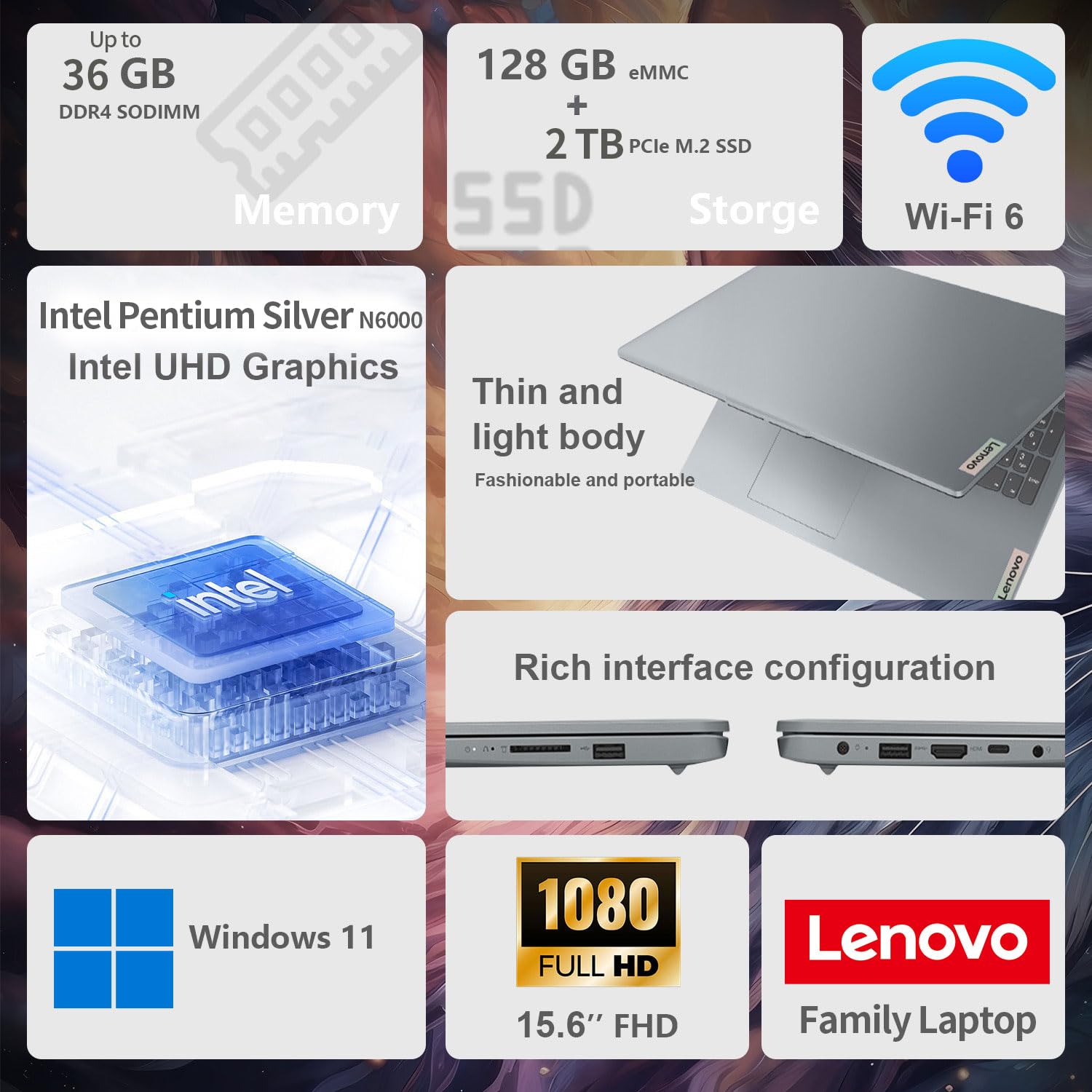
Lenovo pairs a genuinely generous 20GB of DDR4 RAM with an Intel Celeron N4500 processor: 2 cores, 2 threads, a 1.1 GHz base clock and a 2.8 GHz turbo speed. This is worth stating plainly: a large amount of RAM helps with running many browser tabs or applications simultaneously without freezing, but it does not compensate for a low-power, entry-level processor when it comes to raw computational speed for demanding tasks. Performance and speed are both uneven, which tracks directly with this hardware imbalance: RAM-heavy multitasking will feel smooth, but CPU-intensive work will still feel slow regardless of how much memory is installed. The 20GB is also the maximum this machine takes, so there is no upgrading it later. Setup is a clear strength, with a quick, painless first start.

$519.00 4.0/5 Check price
02

1TB PCIe NVMe SSD, 15.6-Inch FHD Display at 60Hz

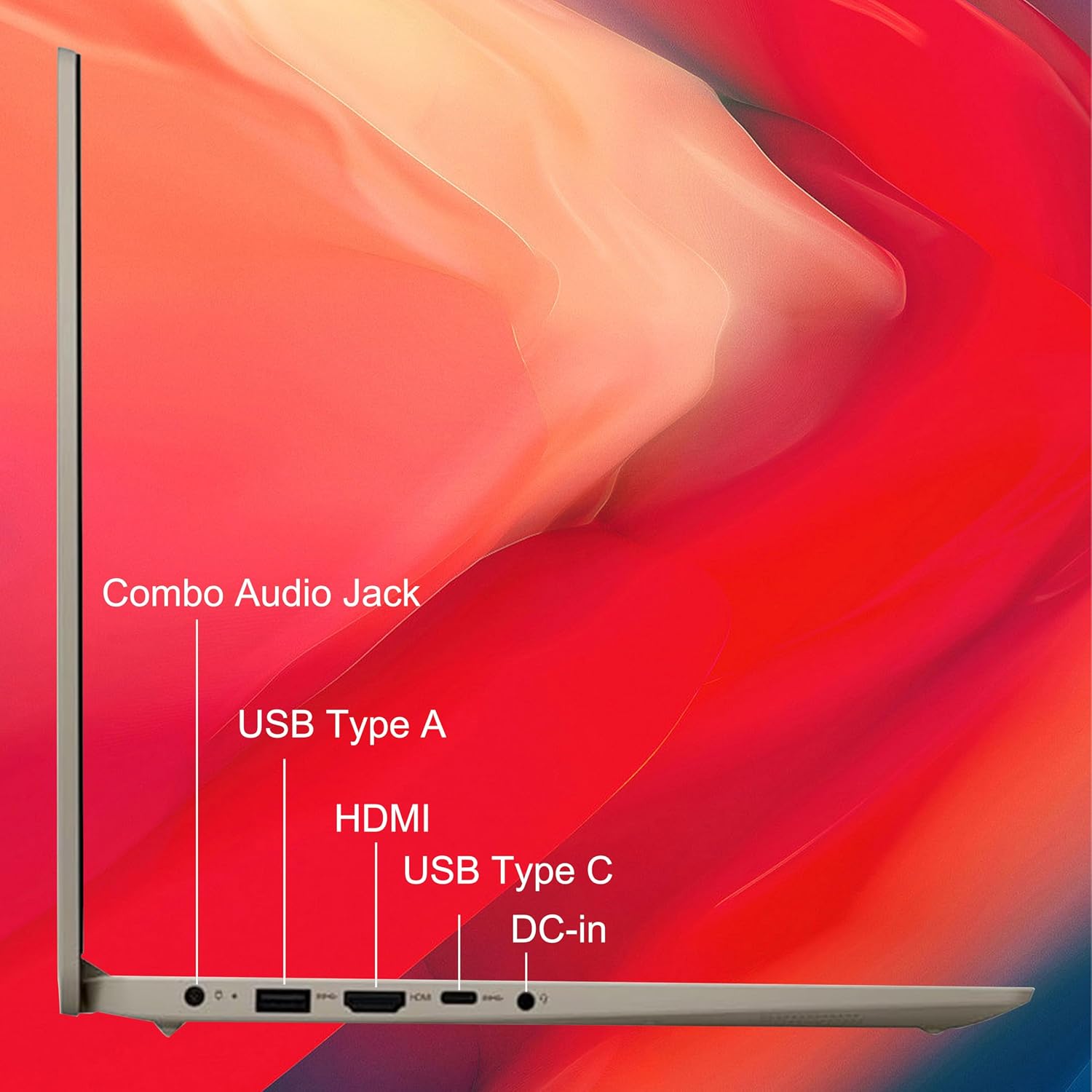
Storage 1TB PCIe NVMe SSD Display 15.6" FHD, 60Hz USB Ports 3 total (1 Type-C, 2 Type-A)

Storage is a 1TB PCIe NVMe M.2 solid state drive, which Lenovo pitches for fast boot-up and data transfer, and there is an SD card reader for moving photos across. The screen is a 15.6-inch Full HD (1920x1080) panel at a 60Hz refresh rate, without touch. Connections cover Wi-Fi 6, Bluetooth, HDMI, a headphone and microphone combo jack and 3 USB ports (one Type-C, two Type-A), and there is a webcam and a full numeric keypad for anyone who works with figures. It can boot quickly, and the roomy drive is one of its biggest draws.

$519.00 4.0/5 Check price
03

Where It Falls Short: Quality, Speed and Value

Setup Quick and easy Quality/Value/Battery Uneven Graphics Integrated Intel UHD

This deserves direct attention. Setup is the only thing it does reliably well; quality, performance, speed, value for money, battery life and storage are all less consistent, and it can leave you disappointed. Its best selling points are the amount of RAM and storage for the money, and it can be light enough to carry from room to room, with a keyboard that may feel familiar to long-time Lenovo users. It can also run well as a Linux machine if you replace Windows. Treat it as a capable everyday laptop with an entry-level heart, and the uneven picture makes sense: anyone who expects more speed than a Celeron can give is the likeliest to be let down.

$519.00 4.0/5 Check price
04

Battery, Weight and Who It Suits

Weight 3.5 pounds Battery Life 9 hours (rated) Thickness 0.75 inches

Lenovo rates the battery at 9 hours, and real-world runtime varies, though for someone coming from a much older laptop it can feel like a big step up. At 3.5 pounds and 0.75 inches thick, it is light for a 15.6-inch machine with a numeric keypad. This is a genuine budget choice specifically for light, everyday tasks such as web browsing, documents, streaming and basic multitasking, rather than a machine suited for demanding software or heavy multitasking under load. Buyers specifically drawn in by the '20GB RAM' headline figure should understand the Celeron N4500 processor, not the RAM, will be the limiting factor for anything computationally demanding.

$519.00 4.0/5 Check price

How We Scored It

Based on
The manufacturer's published specifications and the product's live Amazon listing.
Owner rating
4.2 out of 5 on Amazon, recorded September 26, 2026
How we score
We score each thing that comes up most in owner feedback on the Lenovo IdeaPad 1 Laptop. Eight things come up most in owner feedback: one draws praise, six split opinion and one draws mostly complaints. Its ratings average 4.2 stars (68% five stars, 12% four, 5% three and 15% one or two), so every score starts at 84, that average on a 100 point scale. Where opinion is split, we take off 6. Where it draws mostly complaints, we take off 12. Then we read six owner reviews in full (every one we found gave it four or five stars) and move the score up to 5 points either way depending on how the owners who mention it rated the product. Our overall score starts from the same 4.2 star average and loses 0.1 for each thing that draws mostly complaints, with 0.1 more when at least a tenth of ratings are one star, never more than 0.3 in all. Here that takes off 0.2, which gives 4.0. Read our editorial standards

Quality

Two of the six owner reviews we read mention it, and those owners gave the product four or five stars, so the complaints come from the wider group of buyers. None of the reviews we read say what goes wrong, so this score rests on the buyer ratings. 20% of all ratings are three stars or fewer, which is where complaints like this usually sit. Score 78: we started at 84 and took off 6 because opinion…

Read the full note (410 characters)

Two of the six owner reviews we read mention it, and those owners gave the product four or five stars, so the complaints come from the wider group of buyers. None of the reviews we read say what goes wrong, so this score rests on the buyer ratings. 20% of all ratings are three stars or fewer, which is where complaints like this usually sit. Score 78: we started at 84 and took off 6 because opinion is split.

78Mixed

Performance

Three of the six owner reviews we read mention it, and those owners gave the product four or five stars, so the complaints come from the wider group of buyers. 20% of all ratings are three stars or fewer, which is where complaints like this usually sit. Score 78: we started at 84 and took off 6 because opinion is split.

78Mixed

Speed

Lenovo lists the processor speed as 2.8 GHz and the memory clock speed as 2400 MHz. None of the six owner reviews we read mention it. 20% of all ratings are three stars or fewer, which is where complaints like this usually sit. Score 78: we started at 84 and took off 6 because opinion is split.

78Mixed

Battery Life

Lenovo lists the battery life as 9 hours. One of the six owner reviews we read mentions it, and that owner gave the product four or five stars, so the complaints come from the wider group of buyers. None of the reviews we read say what goes wrong, so this score rests on the buyer ratings. 20% of all ratings are three stars or fewer, which is where complaints like this usually sit. Score 78: we sta…

Read the full note (451 characters)

Lenovo lists the battery life as 9 hours. One of the six owner reviews we read mentions it, and that owner gave the product four or five stars, so the complaints come from the wider group of buyers. None of the reviews we read say what goes wrong, so this score rests on the buyer ratings. 20% of all ratings are three stars or fewer, which is where complaints like this usually sit. Score 78: we started at 84 and took off 6 because opinion is split.

78Mixed

Storage Capacity

Lenovo lists the screen size as 15.6 inches and the hard disk size as 1 TB. One of the six owner reviews we read mentions it, and that owner gave the product four or five stars, so the complaints come from the wider group of buyers. 20% of all ratings are three stars or fewer, which is where complaints like this usually sit. Score 78: we started at 84 and took off 6 because opinion is split.

78Mixed

Disappointing

None of the six owner reviews we read mention it. 20% of all ratings are three stars or fewer, which is where complaints like this usually sit. Score 72: we started at 84 and took off 12 because it draws mostly complaints.

72Needs Improvement

Owner Satisfaction

68% of ratings are five stars and 12% are four. 5% are three stars and 15% are one or two. A sizable share of ratings sit low, so weigh the drawbacks below as heavily as the praise. Score 84: its 4.2 star average on a 100 point scale.

84Mostly Positive

Value for Money

Three of the six owner reviews we read mention it, and those owners gave the product four or five stars, so the complaints come from the wider group of buyers. None of the reviews we read say what goes wrong, so this score rests on the buyer ratings. 20% of all ratings are three stars or fewer, which is where complaints like this usually sit. Score 78: we started at 84 and took off 6 because opini…

Read the full note (412 characters)

Three of the six owner reviews we read mention it, and those owners gave the product four or five stars, so the complaints come from the wider group of buyers. None of the reviews we read say what goes wrong, so this score rests on the buyer ratings. 20% of all ratings are three stars or fewer, which is where complaints like this usually sit. Score 78: we started at 84 and took off 6 because opinion is split.

78Mixed

Specifications

Size and weight

Memory Storage Capacity
1 TB
Item Dimensions L x W x Thickness
14.03"L x 9.6"W x 0.75"Th
Item Weight
3.5 pounds

Power

Voltage
3.6 volts
Battery Life
9 hours

Materials and warranty

Color
Gray

What Buyers Say

Based on 609 Amazon customer ratings, averaging 4.2 out of 5, recorded 12 September 2026. See the reviews on Amazon

5 stars 67%
4 stars 12%
3 stars 6%
2 stars 5%
1 stars 10%
★★★★★

Excellent value, nice ergonomics, does the job.

This little beast boots quickly and has enough horsepower to get the job done. It's not for gamers but it's sleek with good ergonomics and a good video card - plenty good enough for most use… Read it on Amazon
Thomas Altfather Good · February 11, 2025 · Verified
★★★★★

not fancy, but solid performer.

My old Levono laptop is ancient. It dates back Windows 7. It was time to upgrade. I like the feel of Levono keyboards, and they to be trouble free for many years. The new one is very light, … Read it on Amazon
uncleturbo · August 30, 2024 · Verified
★★★★★

Great machine...horrible Win11

Excellent machine, but comes pre-loaded with Windows 11, which I've come to hate because of pre-configured privacy issues with this OS. Check out the numerous YouTube videos which show you h… Read it on Amazon
J Black · March 26, 2026 · Verified
★★★★★

It's good. Worth the price paid.

I really like this little Lenovo laptop. It works very well and I have always had good success with Lenovo products. Has a 1 Tb of memory and 12 gb. Ram. Overall I am quite pleased with it.
Hambone99 · May 9, 2026 · Verified
★★★★★

Best for the least

Superb unit, super fast, excellent work, travel Laptop. Most RAM I could find for the money, and 1TB Solid State HD.
Jay McCreary · March 28, 2026 · Verified
★★★★★

lat top

works great i'm still using it
ronald kennedy · June 15, 2026 · Verified

Setting It Up

  1. Initial Power-On and Windows 11 Setup

    Connect the AC adapter and press the power button. Follow the Windows 11 setup prompts to choose your region, connect to Wi-Fi, and sign in with a Microsoft account.

  2. Microsoft Office 365 Activation

    Open the pre-installed Office app and sign in with a Microsoft account to activate the included one-year Office 365 subscription, which covers Word, Excel, PowerPoint and Outlook.

  3. Display Settings

    Adjust screen brightness in Settings > System > Display to a comfortable level for indoor use. The panel is a 15.6-inch Full HD, 60Hz display without touch support.

  4. Power Management Configuration

    Set a sleep timeout in Settings > System > Power and choose a power mode that balances performance and battery life, since Lenovo rates the battery at 9 hours.

  5. Storage Organization Setup

    With 1TB of SSD storage, set up a simple folder structure in File Explorer for documents, downloads and media so the space stays easy to navigate.

  6. Trackpad Gesture Setup

    Open Settings > Bluetooth & devices > Touchpad to turn on Windows Precision gestures such as three- and four-finger swipes for switching apps and virtual desktops, and adjust pointer speed to taste.

Common Questions

Does the 20GB of RAM make this fast for demanding work?

Not necessarily. The RAM helps with multitasking, keeping many browser tabs or apps open without freezing, but the Celeron N4500 processor is a low-power, entry-level 2-core chip. Performance and speed are both uneven, consistent with a CPU that remains the real bottleneck for demanding tasks regardless of RAM amount.

Is it good for gaming or heavy software?

No. The Celeron N4500 with integrated Intel UHD graphics is designed for light, everyday tasks like browsing, documents and streaming, not gaming or resource-intensive software. It handles everyday work well, but it is not a machine for gamers.

Is the 1TB storage a single SSD, or a combination with an HDD?

Lenovo specifies a 1TB PCIe NVMe M.2 solid state drive, so there is no spinning hard drive to slow things down. The machine may also carry a small eMMC boot drive built into the motherboard alongside the SSD.

Why does it disappoint some people?

This is a fair thing to ask. Most units satisfy, but it can disappoint, and quality, value for money and battery life are all less consistent than its strengths. A likely reason is expectation: the 20GB RAM figure can suggest a faster machine than an entry-level Celeron delivers, so anyone who wants speed for heavier work is the likeliest to be let down.

How's the battery life in real use?

Lenovo rates it at 9 hours, but real-world results vary. For anyone upgrading from an old laptop that managed only an hour or two, it can feel like a big improvement.

Does it come with Windows 11, and is that a problem?

Yes, it ships with Windows 11 Home, bundled with a year of Office 365. If Windows 11's default privacy settings concern you, plan to review them after setup.

On Video

6 videos

Review: LENOVO IdeaPad 1 Laptop, 15.6” FHD Display, Intel Celeron N4500 Processor, 20GB RAM, 1TB SSD

Guy Reviews
All videos
  1. Review: LENOVO IdeaPad 1 Laptop, 15.6” FHD Display, Intel Celeron N4500 Processor, 20GB RAM, 1TB SSD Guy Reviews
  2. Why is EVERYONE Buying this Laptop ??? Lenovo IdeaPad 1 Tech Closet
  3. Lenovo IdeaPad 1 (2024) Review: The World's Most Popular Ultra Budget Laptop! SoulOfTech
  4. Lenovo IdeaPad 1 15.6" Review | COSTCO REVIEW TheRealReviewz
  5. Lenovo IdeaPad 1 Laptop #shorts #amazondeals #amazonfinds Deal Haven
  6. Review: LENOVO IdeaPad 1 Laptop, 15.6” FHD Display, Intel Celeron N4500 Processor, 20GB RAM, 1... Askdeb Reviews

The Verdict

4.0Out of 5

The Lenovo IdeaPad 1 prioritizes multitasking capacity and storage abundance over raw processing power, which makes sense for people who spend their day in documents, browser tabs and streaming rather than demanding software. The 15.6-inch FHD display suits typical office and study use, and bundled Windows 11 Home with a year of Office 365 adds practical value out of the box. It suits students managing course material, remote workers running several browser-based tools at once, and home users who want plenty of storage without gaming or content-creation ambitions.

Who should buy it

  • Students juggling tabs and video calls
  • Remote workers focused on documents, spreadsheets, email and web-based tools that benefit from extra multitasking room
  • Home users building a personal media or photo library who want ample storage without managing external drives
  • Buyers who want maximum RAM and storage and are willing to accept an entry-level processor in exchange
  • Anyone who regularly works with spreadsheets or financial data and wants a dedicated numeric keypad

The Lenovo IdeaPad 1 succeeds by flipping the usual laptop trade-off: it maximizes RAM and storage while accepting a modest processor. The 20GB of memory gives genuine multitasking freedom for browser-heavy work, and the 1TB SSD removes the need to manage space carefully. The Celeron N4500 will not satisfy anyone doing video editing, photo editing or gaming, but it is adequate for Office work, browsing and video calls, which cover most people's daily use. It suits students, remote workers and home users whose priority is document quantity and storage rather than processing speed.

Check price on Amazon

More Reviews