Never Miss Another Deal!

No Fuss Deal Surprise Me

Teamgee H5-T Video Hub Review: The Right Part Only If You Own a Teamgee Monitor

The Teamgee H5-T Conversion Hub is best for owners of a Teamgee S1. The main drawback: only for Teamgee S1/S2/S3/S6 monitors. We scored it 3.3 out of 5.

By ZappyZep, Tech Editor Published December 30, 2025 Updated September 26, 2026
3.3Our score
Teamgee USB Data to Video Conversion Hub, HD Video Transfer Cable for Laptops with One Or No HDMI Port, Supports M1/M2/M3 MacBook Air/Pro and Windows-Based Devices, Driver Installation Required Teamgee USB Data to Video Conversion Hub, HD Video Transfer Cable for Laptops with One Or No HDMI Port, Supports M1/M2/M3 MacBook Air/Pro and Windows-Based Devices, Driver Installation Required, view 2 Teamgee USB Data to Video Conversion Hub, HD Video Transfer Cable for Laptops with One Or No HDMI Port, Supports M1/M2/M3 MacBook Air/Pro and Windows-Based Devices, Driver Installation Required, view 3 Teamgee USB Data to Video Conversion Hub, HD Video Transfer Cable for Laptops with One Or No HDMI Port, Supports M1/M2/M3 MacBook Air/Pro and Windows-Based Devices, Driver Installation Required, view 4
Product gallery, 4 images

Prices shown were correct on September 26, 2026 and change frequently.

TL;DRThe Short Answer: Is the Teamgee H5-T Conversion Hub Worth It?

A laptop with one HDMI port, or none, leaves a portable monitor sitting in the bag. The Teamgee H5-T fixes that, but only for one audience: Teamgee says it works solely with its own S1, S2, S3 and S6 monitors, plugged into the Type-C with DP port on the back. Own one of those screens and it is the part that gets it running, from a USB-A or USB-C laptop, on macOS or Windows. Just budget for two things the hub alone will not handle: a driver install and a separate power adapter for the screen.

NoFussDeal rates the Teamgee H5-T Conversion Hub 3.3 out of 5 at $29.99. Last updated September 26, 2026.

Key Facts

Maximum Voltage
525 Millivolts
Color
Black
Item Weight
55 g
Special Feature
USB to HDMI Conversion, Video Signal Transfer
Connectivity Technology
USB
Compatible Devices
Laptop, Personal Computer

What Stands Out

  1. Only for Teamgee S1/S2/S3/S6 monitors, as Teamgee states up front
  2. Switchable USB-A and USB-C plug, for laptops with a single HDMI port or none
  3. Driver installation is required: the driver prompts when the hub is connected
  4. An external 5V/2A power adapter is needed to power the screen
  5. Must connect to the [Type-C with DP] port on the back of the monitor

Strengths and Drawbacks

What works

  • Does the job it is built for: video out of a laptop that has one HDMI port or none
  • Switchable USB-A and USB-C plug, so one part fits both older and newer machines
  • Stated support for macOS including M1, M2 and M3 chips as well as Windows
  • Buyers call it good value for a part that decides whether a Teamgee portable monitor gets used at all
  • Teamgee states the compatibility restriction up front rather than hiding it
  • Buyers using the intended combination, a laptop plus a supported Teamgee monitor, report it working and rate setup positively

What does not

  • Only for Teamgee S1/S2/S3/S6 monitors, and only via the Type-C with DP port
  • Driver installation is required, and buyers report difficulty with it
  • A separate 5V/2A power adapter is needed to power the screen, so this is not a one-cable setup
  • Needs administrator rights to install the driver, which can rule out locked-down work laptops
  • Owner opinion on performance is mixed, so it suits work windows better than video or games
  • Plug shape, monitor port, driver and power all have to be right, so there are more ways for setup to go wrong than with a plain cable

Features in Depth

01

The Compatibility Restriction That Decides Everything

Supported monitors Teamgee S1/S2/S3/S6 Required port Type-C with DP Model H5-T

Teamgee says, in its own words, that the hub is only for Teamgee S1/S2/S3/S6 monitors, and that you must connect it to the Type-C with DP port on the back of the monitor. That single sentence determines whether this product is excellent or useless for you, which is why it comes first here. Two details in that restriction are worth unpacking. The first is that the target is a specific family of Teamgee portable monitors rather than Teamgee products in general, so owning a Teamgee screen is not by itself a guarantee: check your model against those four. The second is the port: a portable monitor may carry several USB-C sockets, and only the one carrying DisplayPort signalling will accept video this way, which is why Teamgee names it explicitly. A buyer who plugs into the wrong socket sees nothing and concludes the hub is faulty. If you do not own one of those monitors, the honest advice is to buy a different class of product entirely, a USB display adapter sold without a monitor restriction, rather than to try this one and hope.

$29.99 3.3/5 Check price
02

Switchable USB-A and USB-C Plug

Connector Switchable USB-A / USB-C Operating systems macOS (M1/M2/M3) and Windows Video HD video transfer

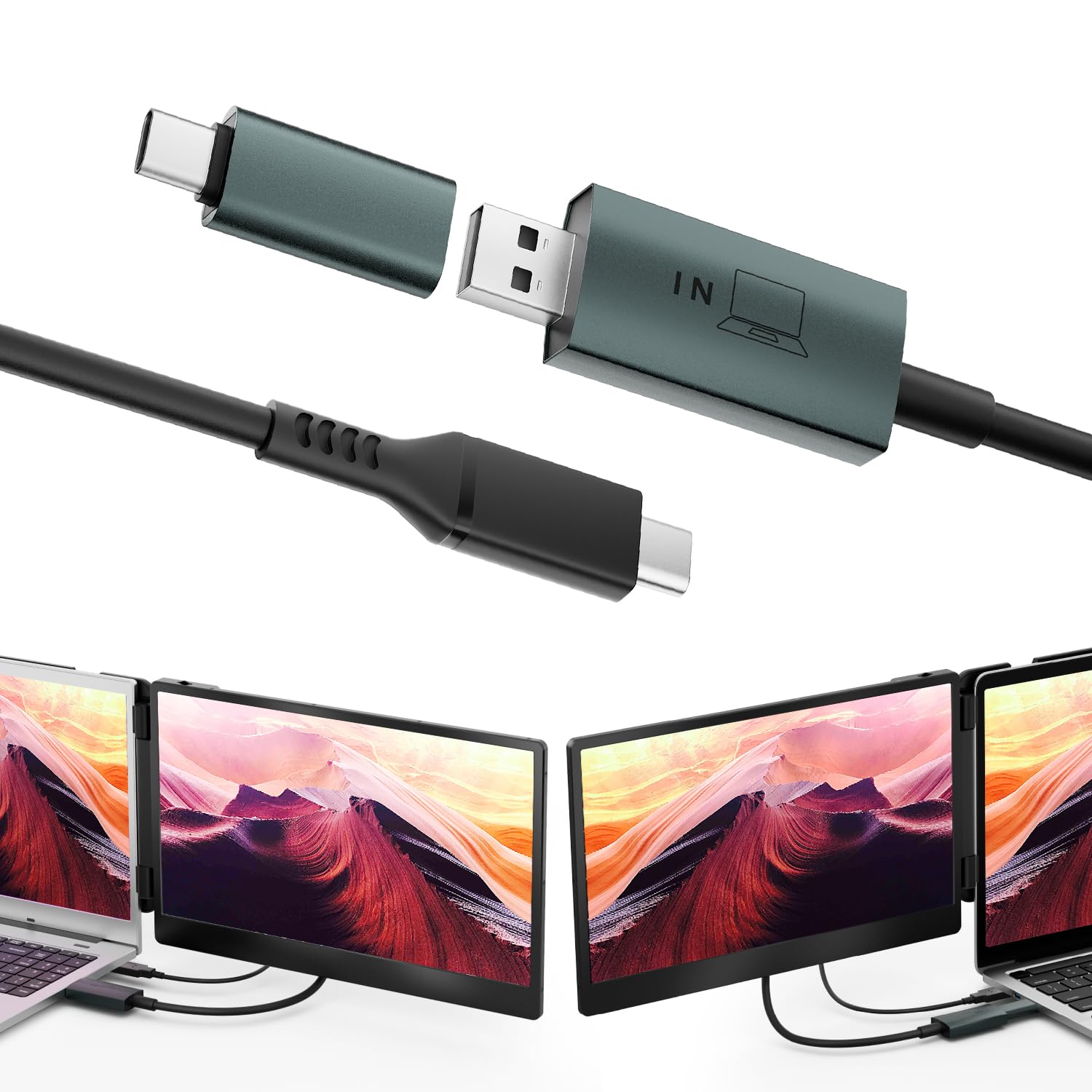
The hub carries a switchable USB-A and USB-C connector, supplied as a removable USB-C connector that fits over a USB-A plug, and this is the feature that makes it useful across a mixed set of machines. The problem it addresses is ordinary: laptops sold in the last few years are often entirely USB-C, while plenty of machines still in daily use, and most desktops, have rectangular USB-A ports. An adapter committed to one shape is an adapter that fits half the computers in a household. Being able to switch means the same part serves a new MacBook and an older Windows laptop without a second purchase or a pile of converters. Teamgee states compatibility with macOS including M1, M2 and M3 chips as well as Windows, which covers the machines most likely to be short of video outputs in the first place. Teamgee describes the output as HD video, which suits its stated purpose: driving a Teamgee portable monitor as a second screen for everyday work. The hub itself is light at 55 g, so it adds almost nothing to a laptop bag.

$29.99 3.3/5 Check price
03

The Driver Requirement, and Where Buyers Get Stuck

Driver Required, prompts on connection Admin rights Needed to install Aspect in reviews Named difficulty

This hub requires driver installation, and Teamgee says so plainly: plug in the hub and install the driver that pops up. The requirement is inherent to what the device does. A passive adapter simply rewires signals that the computer is already producing, which is why a plain HDMI cable needs no software. Sending video out of a general-purpose USB port is different: the computer has to be told to treat that port as a display output and to compress and send frames to it, and that means software on the host machine. The practical consequence is that this is not a plug-and-forget part, and driver installation is the one aspect buyers rate negatively, even while they rate ease of setup and compatibility positively. That combination suggests most people get there, but the driver step is where the friction sits. Before buying, two things are worth checking: that you have administrator rights on the machine you intend to use it with, since installing a display driver requires them, and that the driver supports your operating system version, since major system updates can break display drivers. If the driver does not install, nothing else about the hub matters.

$29.99 3.3/5 Check price
04

External Power, and What Owners Report

Screen power External 5V/2A adapter Included Removable USB-C connector Item Weight 55 g

Teamgee states that while connecting this hub you should connect an external 5V/2A power adapter to power the screen. That is worth reading twice, because it changes what you need on the desk: the hub carries the video signal, but the monitor draws its power separately, so a single cable from the laptop is not the arrangement here. Anyone imagining a one-cable setup should plan for the power adapter as well, and should have one before the first attempt, because a screen that stays dark for want of power looks exactly like a hub that does not work. As for how it behaves once connected, buyers who use it as intended are positive. It can be the fix for a Teamgee S3 paired with a laptop whose USB-C port does not carry video: a setup application runs on connection, and the display settings then let you arrange the screens as you like. Buyers also call it good value for what it does. Performance is the theme where opinion is mixed, so expect a dependable second screen for work rather than a flawless one for fast motion.

$29.99 3.3/5 Check price

How We Scored It

Based on
The manufacturer's published specifications and the product's live Amazon listing.
Owner rating
3.5 out of 5 on Amazon, recorded September 26, 2026
How we score
We score each thing that comes up most in owner feedback on the Teamgee USB Data to Video Conversion. Four things come up most in owner feedback: two draw praise, one splits opinion and one draws mostly complaints. Its ratings average 3.5 stars (37% five stars, 16% four, 26% three and 21% one or two), so every score starts at 70, that average on a 100 point scale. Where opinion is split, we take off 6. Where it draws mostly complaints, we take off 12. Then we read two owner reviews in full (every one we found gave it four or five stars) and move the score up to 5 points either way depending on how the owners who mention it rated the product. Our overall score starts from the same 3.5 star average and loses 0.1 for each thing that draws mostly complaints, with 0.1 more when at least a tenth of ratings are one star, never more than 0.3 in all. Here that takes off 0.2, which gives 3.3. Read our editorial standards

Ease Of Setup

None of the two owner reviews we read mention it. Score 70: its 3.5 star average on a 100 point scale.

70Positive

Compatibility

Teamgee lists the compatible devices as Laptop, Personal Computer and the compatible phone models as No Compatible Phone Models. None of the two owner reviews we read mention it. Score 70: its 3.5 star average on a 100 point scale.

70Positive

Performance

None of the two owner reviews we read mention it. 47% of all ratings are three stars or fewer, which is where complaints like this usually sit. Score 64: we started at 70 and took off 6 because opinion is split.

64Mixed

Driver Installation

None of the two owner reviews we read mention it. 47% of all ratings are three stars or fewer, which is where complaints like this usually sit. Score 58: we started at 70 and took off 12 because it draws mostly complaints.

58Needs Improvement

Owner Satisfaction

37% of ratings are five stars and 16% are four. 26% are three stars and 21% are one or two. A sizable share of ratings sit low, so weigh the drawbacks below as heavily as the praise. Score 70: its 3.5 star average on a 100 point scale.

70Mixed

Specifications

Power

Maximum Voltage
525 Millivolts

Materials and warranty

Color
Black

Size and weight

Item Weight
55 g

Other specifications

Special Feature
USB to HDMI Conversion, Video Signal Transfer
Connectivity Technology
USB
Compatible Devices
Laptop, Personal Computer

What Buyers Say

Based on 10 Amazon customer ratings, averaging 3.5 out of 5, recorded 20 September 2026. See the reviews on Amazon

5 stars 37%
4 stars 16%
3 stars 26%
2 stars 0%
1 stars 21%
★★★★★

Worked perfectly

Worked perfectly for my S3 screen extender since my HP Laptop didnt have the right USB-C port for video. Once I connected it into the HDMI slot and using the converter into my C slot ony lap… Read it on Amazon
israel d. · August 18, 2025 · Verified
★★★★★

the price

Was a Great Item especially for the price
Egypt Bradley · January 29, 2025 · Verified

Setting It Up

  1. Check your monitor model first

    Teamgee restricts this hub to its S1, S2, S3 and S6 monitors. Confirm your model is one of those four before ordering; this is the single check that prevents a return.

  2. Find the Type-C with DP port

    Teamgee specifies the port marked Type-C with DP on the back of the monitor. A portable monitor can have several USB-C sockets and only one will carry video this way.

  3. Have a 5V/2A power adapter ready

    Teamgee says to connect an external 5V/2A adapter to power the screen. Without it the monitor stays dark, which looks identical to a hub that does not work.

  4. Select the right plug

    The connector switches between USB-A and USB-C. Set it to match the port on the computer before plugging anything in.

  5. Install the driver when it prompts

    Video over USB needs software on the host machine. Teamgee says the driver pops up when the hub is connected; you will need administrator rights on that computer to install it.

  6. Check the display settings once it is installed

    After the driver installs, the second screen appears in the operating system's display settings, where you choose whether it extends the desktop or duplicates it, the two modes Teamgee describes.

Common Questions

Will this let me run any monitor from my laptop's USB port?

No, and this is the thing to settle before anything else. Teamgee states plainly that the H5-T is only for its own S1, S2, S3 and S6 monitors, and that it connects to the Type-C port marked DP on the back of the screen. It is not a general-purpose USB-to-HDMI adapter for whatever display you already own. If you do not have one of those Teamgee screens, nothing else on this page matters much: it is the wrong part, and no amount of driver work will change that. Check the label on the back of your screen before ordering.

My laptop already has USB-C. How do I know whether I need this at all?

A USB-C port is not automatically a video port. Carrying a display signal needs DisplayPort Alt Mode, a hardware capability the manufacturer either built into that specific port or did not, and it cannot be switched on in software afterwards. Check your laptop maker's technical specifications for wording such as DisplayPort over USB-C, USB4 or Thunderbolt. A lightning bolt or DP marking beside the socket is a hint, not proof. This hub exists for machines whose ports move data only, which is exactly the gap owners bought it to close.

Why does it need a driver when a video cable normally just works?

Because no display signal is leaving the port in the first place. A plain USB connection carries data, not video, so a device like this works the other way round: software on your computer creates a virtual display, compresses each frame and streams it over USB for the hub to turn back into a picture. That is why Teamgee makes the driver mandatory rather than optional, and why this class of device behaves differently from a straight cable in ways worth knowing before you order rather than after.

Driver installation is the main complaint. How do I get through it cleanly?

Plan for it rather than trusting the pop-up to handle everything. Use an administrator account, let the installer finish completely and restart before judging the result. On recent macOS versions, software that builds a virtual display may need to be granted the Screen Recording privacy permission. Nothing is being recorded; it is simply how the system lets a driver read the pixels it needs. If everything appears connected but the screen stays blank, check that permission, then the power adapter and the monitor port.

Does the monitor still need its own power supply?

Yes. Teamgee specifies connecting an external 5V/2A adapter to power the screen while the hub is in use, so budget a spare socket and do not expect a single cable from the laptop to do everything. The reason is simple: the hub carries the picture, not power for the panel, and a laptop's USB port has only a limited amount of power to spare. Without the adapter the display is likely to stay dark or behave erratically, which reads as a fault but is not one.

Is the picture good enough for video or gaming?

Set expectations at productivity rather than motion. Because frames are compressed and pushed down a USB connection instead of travelling over a dedicated video link, this class of device suits documents, email, spreadsheets and reference windows far better than fast action, and owner feedback on performance here is mixed rather than glowing. If the second screen is where your code, your notes or your inbox live, it does that job. If it is where you want to play or watch, connect it directly instead.

The Verdict

3.3Out of 5
Right Part, Narrow Fit

This is a proprietary accessory wearing the title of a universal one, and everything follows from that. Teamgee states it is only for its S1, S2, S3 and S6 monitors, connected to the port marked Type-C with DP. Meet those conditions and it does a genuinely useful job: it gets a second screen running from a laptop with one HDMI port or none, over USB-A or USB-C as the machine requires, on macOS or Windows. Miss them and nothing will make it work. Two further requirements are easy to overlook and worth arranging before it arrives: a driver that needs administrator rights to install, which is the step buyers like least, and an external 5V/2A adapter to power the screen. The score is held down by that narrow scope, the driver friction and mixed feedback on performance, since most people reading a review of a USB video hub are not the intended buyer. If you are the intended buyer, it is the part you need.

Who should buy it

  • Owners of a Teamgee S1, S2, S3 or S6 portable monitor whose laptop has no spare video output
  • Anyone switching between an older USB-A laptop and a newer USB-C machine with the same monitor
  • Buyers comfortable installing a display driver and providing a separate 5V/2A supply for the screen

Only for Teamgee S1/S2/S3/S6 monitors. Check your model first; if it matches, this is a fairly priced part that makes the screen usable, as long as you are ready to install a driver and power the monitor separately.

Check price on Amazon

More Reviews