Never Miss Another Deal!

No Fuss Deal Surprise Me

TP-Link Archer A7 Review: Dependable Wi-Fi 5 for Modest Homes

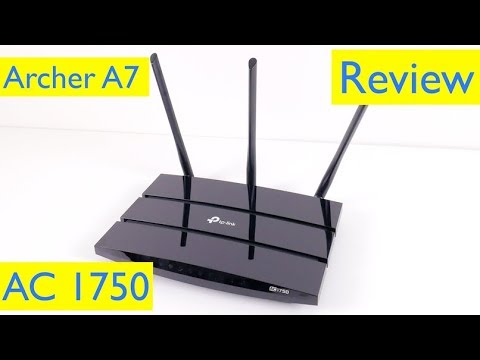
TP-Link's Archer A7 is a dual-band AC1750 router with four gigabit Ethernet ports, a gigabit WAN port, a USB 2.0 port and a Qualcomm processor, set up and managed through the Tether app or a web browser. It has been a default upgrade from rented ISP routers for years. That long track record is its strength and its caveat: it is easy to live with, but it belongs to an older Wi-Fi generation, and its weak points show up over months rather than on day one.

By Athena, Home & Family Editor Published September 27, 2026 Updated September 27, 2026
4.2Our score
TP-Link Archer AC1750 WiFi Router - Dualband Gigabit, Qualcomm inside, Works with Alexa(A7), Black

Prices shown were correct on September 27, 2026 and change frequently.

TL;DRThe Short Answer: Is the TP-Link Archer A7 AC1750 WiFi Router Worth It?

Setup is painless and coverage is generous, but this is a Wi-Fi 5 router from an older generation, and its weak spots are the ones that matter over years: dropped connections and units that eventually give out. For a medium-sized home on a plan of a few hundred megabits, it is still a sensible pick. Dual-band 802.11ac, four gigabit Ethernet ports, a USB 2.0 port and the Tether app cover the basics well. Anyone wanting Wi-Fi 6 should look newer.

NoFussDeal rates the TP-Link Archer A7 AC1750 WiFi Router 4.2 out of 5 at $119.99. Last updated September 27, 2026.

Key Facts

Wireless Type
802.11ac, 802.11b, 802.11g, 802.11n
Number of USB 2.0 Ports
1

What Stands Out

  1. Dual-band wireless: 802.11ac/n/a on 5 GHz and 802.11b/g/n on 2.4 GHz.
  2. Four gigabit LAN ports and a gigabit WAN port for wired TVs, consoles and computers.
  3. TP-Link rates coverage at up to 2,500 sq ft.
  4. One USB 2.0 port shares a drive across the home network.
  5. Set up and managed from the Tether app or a full web interface, with guest networks and parental controls.
  6. Works with Alexa, and supports both IPv4 and IPv6.

Strengths and Drawbacks

What works

  • Easy setup through the Tether app, with a fuller web interface for fine control.
  • Strong coverage for a typical family home, rated at up to 2,500 sq ft.
  • Gigabit WAN and four gigabit LAN ports keep wired devices at full speed.
  • Guest networks and per-device parental controls with schedules.
  • USB 2.0 port shares a drive across the network.
  • Works with Alexa, and the LEDs can be switched off.

What does not

  • Wi-Fi 5 only, with no Wi-Fi 6 support for newer devices.
  • Dropped connections are the most common complaint.
  • Some units fail after months or a couple of years of use.
  • No 160 MHz channels, which can hold some laptops below their rated 5 GHz speed.
  • The 2.4 GHz band slows noticeably with distance.
  • Latency can rise in a busy home with many devices active at once.

Features in Depth

01

Dual-Band 802.11ac Wireless and Coverage

Wi-Fi Standard 802.11ac/n/a (5 GHz), 802.11b/g/n (2.4 GHz) Bands 2.4 GHz and 5 GHz Rated Coverage Up to 2,500 sq ft

The Archer A7 runs two separate radios. The 5 GHz band uses 802.11ac, the Wi-Fi 5 standard, and is where phones, laptops and streaming boxes get their best speed near the router. The 2.4 GHz band uses 802.11b/g/n, reaching further and passing through walls more easily, but at far lower speeds and in a band shared with neighbours' networks, Bluetooth and microwave ovens. TP-Link rates coverage at up to 2,500 sq ft, and one owner in a house about that size found the signal robust in every room, while another now reaches the edge of the back yard. Speed and signal strength divide opinion more than coverage does, which is typical: the same router can feel fast in the living room and sluggish two floors away, particularly on 2.4 GHz. One owner recommends turning beamforming off, after finding it reduced throughput in their home; it is a setting worth trying both ways if speeds disappoint. Placement matters more than any setting, so put the router high and central, not in a cabinet or behind a TV.
$119.99 4.2/5 Check price
02

Gigabit Ports and USB Sharing

LAN Ports 4 x 10/100/1000 Mbps WAN Port 1 x 10/100/1000 Mbps USB 1 x USB 2.0

Every Ethernet port on the Archer A7 is gigabit: one 10/100/1000 Mbps WAN port for the modem and four 10/100/1000 Mbps LAN ports. That matters more than it sounds. Plenty of older ISP-supplied routers still have 100 Mbps ports, which cap a faster plan before Wi-Fi even enters the picture. With four LAN ports, a TV, a games console, a desktop and a printer can all sit on cables, which frees up the wireless side for phones and laptops. One owner runs a second Archer A7 upstairs as a wired access point, linked back by Ethernet, and covers a multi-floor house that way. The single USB 2.0 port turns a USB drive into shared network storage. One owner uses it with a file browser app on an iPhone to move photos and files to a computer without any cloud service. USB 2.0 is slow for large video transfers, so treat it as a convenience for documents, photos and music rather than a backup server.

$119.99 4.2/5 Check price
03

Tether App, Guest Networks and Parental Controls

Setup Tether app or web browser Voice Control Works with Alexa Protocols IPv4 and IPv6

Easy setup is one of the most praised points, and the Tether app is the reason. It walks through connecting to the modem and naming the network from a phone. It is not flawless: one owner's first attempt only connected over the 2.4 GHz network, and the binding step froze once and had to be repeated, though the whole install still took under 45 minutes. The web interface goes deeper, with separate guest networks for each band that can be switched on and off individually, and parental controls that restrict chosen devices to set hours or block sites by keyword. The LEDs can be switched off from the app, and the router works with Alexa for voice control. It supports IPv4 and IPv6, and any recent browser can reach the interface on Windows, macOS or Linux. The quick setup is the easy part; the web interface rewards a little time spent learning it, because that is where most of the useful controls live.

$119.99 4.2/5 Check price
04

Reliability, Age and Long-Term Support

Processor Qualcomm CPU Generation Wi-Fi 5 (802.11ac)

Reliability is the part to weigh most carefully. Connectivity and reliability both draw more complaints than praise, and the complaints are the kind that show up after the return window: connections that drop until the router is power-cycled, and units that stop working after months or a couple of years. One owner's router lasted two years before it began dropping a 4K TV and phone calls. Another could not get the router to connect to a re-provisioned cable modem until the reset button was held for more than 30 seconds, well beyond the manual's shorter hold. Others report years of continuous service with the occasional reboot, and describe the build as sturdy. The router runs on a Qualcomm processor; like any router, it lasts longer out of hot cupboards and direct sun. As a Wi-Fi 5 router, it will not use Wi-Fi 6 features in newer devices, and firmware updates now arrive less often than on TP-Link's newer lines, according to one owner, while another is still receiving them.

$119.99 4.2/5 Check price

How We Scored It

Based on
The manufacturer's published specifications and the product's live Amazon listing.
Owner rating
4.4 out of 5 on Amazon, recorded September 27, 2026
How we score
We score each thing that comes up most in owner feedback on the TP-Link Archer AC1750 WiFi Router. Eight things come up most in owner feedback: four draw praise, two split opinion and two draw mostly complaints. Its ratings average 4.4 stars (72% five stars, 15% four, 6% three and 7% one or two), so every score starts at 88, that average on a 100 point scale. Where opinion is split, we take off 6. Where it draws mostly complaints, we take off 12. Then we read seven owner reviews in full, including the critical ones, and move the score up to 5 points either way depending on how the owners who mention it rated the product. Our overall score starts from the same 4.4 star average and loses 0.1 for each thing that draws mostly complaints, with 0.1 more when at least a tenth of ratings are one star, never more than 0.3 in all. Here that takes off 0.2, which gives 4.2. Read our editorial standards

Quality

Two of the seven owner reviews we read mention it. One gave the product four or five stars and one gave it three or fewer. Score 88: we started at 88 and left it there because the owner reviews that mention it are evenly split.

88Positive

Easy Setup

All of the seven owner reviews we read mention it. Six gave the product four or five stars and one gave it three or fewer. Score 92: we started at 88 and added 4 because the owner reviews that mention it are positive.

92Positive

Speed

Six of the seven owner reviews we read mention it. Five gave the product four or five stars and one gave it three or fewer. 13% of all ratings are three stars or fewer, which is where complaints like this usually sit. Score 82: we started at 88 and took off 6 because opinion is split.

82Mixed

Signal Strength

Four of the seven owner reviews we read mention it, and those owners gave the product four or five stars, so the complaints come from the wider group of buyers. None of the reviews we read say what goes wrong, so this score rests on the buyer ratings. 13% of all ratings are three stars or fewer, which is where complaints like this usually sit. Score 82: we started at 88 and took off 6 because opin…

Read the full note (413 characters)

Four of the seven owner reviews we read mention it, and those owners gave the product four or five stars, so the complaints come from the wider group of buyers. None of the reviews we read say what goes wrong, so this score rests on the buyer ratings. 13% of all ratings are three stars or fewer, which is where complaints like this usually sit. Score 82: we started at 88 and took off 6 because opinion is split.

82Mixed

Connectivity

Five of the seven owner reviews we read mention it, and those owners gave the product four or five stars, so the complaints come from the wider group of buyers. None of the reviews we read say what goes wrong, so this score rests on the buyer ratings. 13% of all ratings are three stars or fewer, which is where complaints like this usually sit. Score 76: we started at 88 and took off 12 because it …

Read the full note (424 characters)

Five of the seven owner reviews we read mention it, and those owners gave the product four or five stars, so the complaints come from the wider group of buyers. None of the reviews we read say what goes wrong, so this score rests on the buyer ratings. 13% of all ratings are three stars or fewer, which is where complaints like this usually sit. Score 76: we started at 88 and took off 12 because it draws mostly complaints.

76Needs Improvement

Reliability

Three of the seven owner reviews we read mention it. Two gave the product four or five stars and one gave it three or fewer. 13% of all ratings are three stars or fewer, which is where complaints like this usually sit. Score 76: we started at 88 and took off 12 because it draws mostly complaints.

76Needs Improvement

Owner Satisfaction

72% of ratings are five stars and 15% are four. 6% are three stars and 7% are one or two. The spread skews positive, but enough ratings sit low that the drawbacks below are worth reading. One of the seven owner reviews we read gave it three stars or fewer. We look for the critical ones on purpose. Score 88: its 4.4 star average on a 100 point scale.

88Positive

Value for Money

Four of the seven owner reviews we read mention it. All of them gave the product four or five stars. Score 93: we started at 88 and added 5 because the owner reviews that mention it are positive.

93Positive

Specifications

Wireless Type
802.11ac, 802.11b, 802.11g, 802.11n
Number of USB 2.0 Ports
1

What Buyers Say

Build quality, easy setup and value draw the most praise, and range earns credit in typical family homes. Speed and signal strength are more divided, which mostly reflects how far a device sits from the router and which band it uses. Connectivity and long-term reliability draw more complaints than praise: dropped connections, and units that stop working after months or a couple of years of service.

Based on 71,616 Amazon customer ratings, averaging 4.4 out of 5, recorded 27 September 2026. See the reviews on Amazon

5 stars 72%
4 stars 15%
3 stars 6%
2 stars 2%
1 stars 5%
★★★★★

Almost perfect

I just finished installing the A7 TCP-Link 1750AC router replacing a 6 year old Linksys E2500--having had to replace my modem earlier in the week after it failed and went into a reboot loop.… Read it on Amazon
Kindle Customer · June 20, 2020 · Verified
★★★★★

Easy to install, this router upgraded our wifi performance and range

It works as described, and increased our wifi speed from about 30 mbps to 70 on the 5ghz band. We have a router/modem combo (b/g/n, I think) that seemed to max out around 37 mbps over wifi. … Read it on Amazon
JMill · November 30, 2018 · Verified
★★★★★

I don't know if it's the best but it's pretty amazing !

I don't know if it's the best but it's pretty amazing !Without going into details, I will say it just that everything advertised is true for a very good price. Very good web interface to set… Read it on Amazon
ADRStudio · September 13, 2020 · Verified
★★★★★

Strong WiFi, good parental controls

I bought this router to replace the basic N*tgear one provided by my cable company at $5 per month rent. I’m able to use the WiFi at the edge of my backyard which I couldn’t do before. After… Read it on Amazon
fitnessguy · December 27, 2019 · Verified
★★★★★

Reliable, Feature-Rich Router—Great Range and Sturdy Build

I picked up the TP-Link Archer AC1750 when our old router died, and it’s been a fantastic replacement ever since. The range is really solid, it easily covers multiple floors in my house, and… Read it on Amazon
Paulryanp · February 13, 2026 · Verified
★★★★☆

Works Great When It Works, Which Is Most of the Time

Review originally titled, "Plan to Buy A New One Every Few Months"Here's what I originally wrote: "When this device works it's great. Mine failed after 8 months, and trying to deal with TP-L… Read it on Amazon
Voiceguy · April 24, 2020 · Verified

Setting It Up

  1. Pick a central spot

    Place the router high and near the middle of the home, away from metal cabinets, fish tanks and the back of a TV, which all weaken the 5 GHz signal.

  2. Connect the modem

    Power the modem off, connect it to the router's WAN port with an Ethernet cable, then power the modem on before the router. If your ISP's modem also acts as a router, switch that function off to avoid two networks fighting.

  3. Run quick setup

    Use the Tether app or a browser on a wired computer. Reuse your old network name and password so existing devices reconnect without any changes.

  4. Update and back up

    Install any firmware update, then save a backup of the configuration so a later update or reset can be undone in minutes.

  5. Add guests and controls

    Create a guest network for visitors and smart home gadgets, and set parental control schedules for children's devices.

Common Questions

Does the Archer A7 support Wi-Fi 6?

No. It uses 802.11ac, which is Wi-Fi 5, on 5 GHz and 802.11b/g/n on 2.4 GHz. Wi-Fi 6 devices connect fine, but without their Wi-Fi 6 features.

What does AC1750 mean?

It is a class label that adds together the theoretical maximum of both bands. No single device reaches it; real speed depends on the device, the band and the distance from the router.

How many Ethernet ports does it have?

Four gigabit LAN ports for wired devices and one gigabit WAN port for the modem, so a fast internet plan is not capped at the port.

Can it work as an access point?

Yes. One owner runs a second Archer A7 upstairs as an access point, linked to the main router by an Ethernet cable, to cover a multi-floor house.

What is the USB port for?

The USB 2.0 port shares a USB drive across the home network, which suits documents, photos and music. It is slow for moving large video files.

What should I do if it keeps dropping the connection?

Check for a firmware update first, then try a full reset and a fresh setup. If drops continue after that, contact TP-Link or the seller while it is still under warranty.

On Video

6 videos

TP-Link AC1750 Smart WiFi Router Setup and Review - Archer A7

ReviewLamp
All videos
  1. TP-Link AC1750 Smart WiFi Router Setup and Review - Archer A7 ReviewLamp
  2. Skip This or Buy It? TP-Link Archer A7 WiFi Router Review BuildGenius
  3. TP Link AC1750 Smart WiFi Router Archer A7 Dual Band Gigabit Wireless Internet Router Review STeamReviews
  4. The Best-Selling Wireless Router on Amazon- TP-Link Archer A7 Behfor
  5. Ultimate TP-Link AC1750 Smart WiFi Router (Archer A7) - Dual Band Gigabit Wireless Blazing Curious
  6. Comprehensive Comparison Review: TP-Link Archer A6 V2.8 vs. Archer A7 WiFi Routers Lamntn - English

The Verdict

4.2Out of 5

The Archer A7 remains a sensible, low-fuss router for a medium-sized home. Setup through the Tether app is quick, coverage is generous, all five Ethernet ports are gigabit, and guest networks, parental controls and a USB port for shared storage cover what most families need. Its limits come from its generation and its track record. It is Wi-Fi 5, so newer phones and laptops cannot use their Wi-Fi 6 features, it lacks 160 MHz channels, and a busy household can push latency up. The larger worry is long-term reliability: dropped connections and units that fail after months or a couple of years draw more complaints than praise. Buy it for a straightforward upgrade over a rented ISP router, back up your settings, and keep an eye on it in the first year.

Who should buy it

  • Households replacing a rented ISP router
  • Homes up to a few bedrooms with internet plans of a few hundred megabits.
  • Anyone with several wired devices who wants four gigabit LAN ports.
  • Parents who want scheduled, per-device controls from a phone app.

Who should skip it

  • Anyone with Wi-Fi 6 phones and laptops who wants to use those features.
  • Large or multi-storey homes that need mesh coverage from one purchase.
  • Busy households where dozens of devices stream and back up at once.

An easy, capable Wi-Fi 5 router for everyday homes, held back by its age and by reports of dropouts over time.

Check price on Amazon

More Reviews