Never Miss Another Deal!

No Fuss Deal Surprise Me

XPPen 4K UHD Artist Pro 19 Gen2 Review: A Big, Color-Accurate Canvas With Rough Edges in the Details

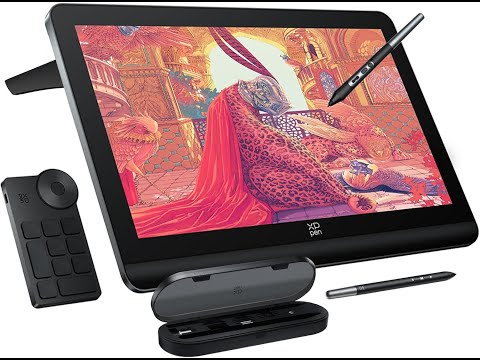
An 18.4-inch 4K pen display aimed at artists who want Cintiq-sized real estate without Cintiq pricing. It delivers a huge, color-accurate canvas and a generous accessory bundle, but buyers may have to work around short included cables, spotty touch, and a three-cable hookup that can be annoying.

By ZappyZep, Tech Editor Published November 1, 2026 Updated November 1, 2026
4.5Our score
XPPen 4K UHD Artist Pro 19 Gen2 Drawing Tablet with Screen, 156% sRGB Graphic Tablet with 1.07 Billion Colors Anti-Glare Drawing Monitor with Dual 16384 Pen Pressure Stylus, Mini Keydial, 18.4" XPPen 4K UHD Artist Pro 19 Gen2 Drawing Tablet with Screen, 156% sRGB Graphic Tablet with 1.07 Billion Colors Anti-Glare Drawing Monitor with Dual 16384 Pen Pressure Stylus, Mini Keydial, 18.4", view 2 XPPen 4K UHD Artist Pro 19 Gen2 Drawing Tablet with Screen, 156% sRGB Graphic Tablet with 1.07 Billion Colors Anti-Glare Drawing Monitor with Dual 16384 Pen Pressure Stylus, Mini Keydial, 18.4", view 3 XPPen 4K UHD Artist Pro 19 Gen2 Drawing Tablet with Screen, 156% sRGB Graphic Tablet with 1.07 Billion Colors Anti-Glare Drawing Monitor with Dual 16384 Pen Pressure Stylus, Mini Keydial, 18.4", view 4 XPPen 4K UHD Artist Pro 19 Gen2 Drawing Tablet with Screen, 156% sRGB Graphic Tablet with 1.07 Billion Colors Anti-Glare Drawing Monitor with Dual 16384 Pen Pressure Stylus, Mini Keydial, 18.4", view 5 XPPen 4K UHD Artist Pro 19 Gen2 Drawing Tablet with Screen, 156% sRGB Graphic Tablet with 1.07 Billion Colors Anti-Glare Drawing Monitor with Dual 16384 Pen Pressure Stylus, Mini Keydial, 18.4", view 6 XPPen 4K UHD Artist Pro 19 Gen2 Drawing Tablet with Screen, 156% sRGB Graphic Tablet with 1.07 Billion Colors Anti-Glare Drawing Monitor with Dual 16384 Pen Pressure Stylus, Mini Keydial, 18.4", view 7 XPPen 4K UHD Artist Pro 19 Gen2 Drawing Tablet with Screen, 156% sRGB Graphic Tablet with 1.07 Billion Colors Anti-Glare Drawing Monitor with Dual 16384 Pen Pressure Stylus, Mini Keydial, 18.4", view 8 XPPen 4K UHD Artist Pro 19 Gen2 Drawing Tablet with Screen, 156% sRGB Graphic Tablet with 1.07 Billion Colors Anti-Glare Drawing Monitor with Dual 16384 Pen Pressure Stylus, Mini Keydial, 18.4", view 9 XPPen 4K UHD Artist Pro 19 Gen2 Drawing Tablet with Screen, 156% sRGB Graphic Tablet with 1.07 Billion Colors Anti-Glare Drawing Monitor with Dual 16384 Pen Pressure Stylus, Mini Keydial, 18.4", view 10 XPPen 4K UHD Artist Pro 19 Gen2 Drawing Tablet with Screen, 156% sRGB Graphic Tablet with 1.07 Billion Colors Anti-Glare Drawing Monitor with Dual 16384 Pen Pressure Stylus, Mini Keydial, 18.4", view 11 XPPen 4K UHD Artist Pro 19 Gen2 Drawing Tablet with Screen, 156% sRGB Graphic Tablet with 1.07 Billion Colors Anti-Glare Drawing Monitor with Dual 16384 Pen Pressure Stylus, Mini Keydial, 18.4", view 12
Product gallery, 12 images

Prices shown were correct on November 1, 2026 and change frequently.

TL;DRThe Short Answer: Is the XPPen 4K UHD Artist Pro 19 Gen2 Worth It?

The xppen 4k uhd artist pro 19 gen2 solves the problem of wanting a large, color-accurate pen display without paying Wacom-level prices for the screen real estate. It is an upgrade over Wacom and Huion tablets, but the catch is in the details: the bundled cables can be too short for some setups, and touch may be spotty enough that some users skip it.

NoFussDeal rates the XPPen 4K UHD Artist Pro 19 Gen2 4.5 out of 5 at $900.00, compared against 6 alternatives sold on Amazon. Last updated November 1, 2026.

Key Facts

Item Dimensions L x W
19"L x 14"W
Color
Dark Silver
Special Feature
4K UHD (3840x2160) resolution, AG etched glass/TÜV SÜD certified, Anti-Glare Glass, Calman Verified/ △E < 1.5, Dual Styl
Connectivity Technology
3-in-1 Cable, USB-C to USB-C Cable
Compatible Devices
Android (USB3.1 DP1.2), ChromeOS 88 (or later), Linux, MacOS 10.13(or later), Windows 7 (or later)
Warranty Description
15-Month Warranty

What Stands Out

  1. 18.4-inch 4K UHD (3840x2160) display gives enough resolution to zoom into fine detail without losing sharpness, and enough screen area to run two applications side by side.
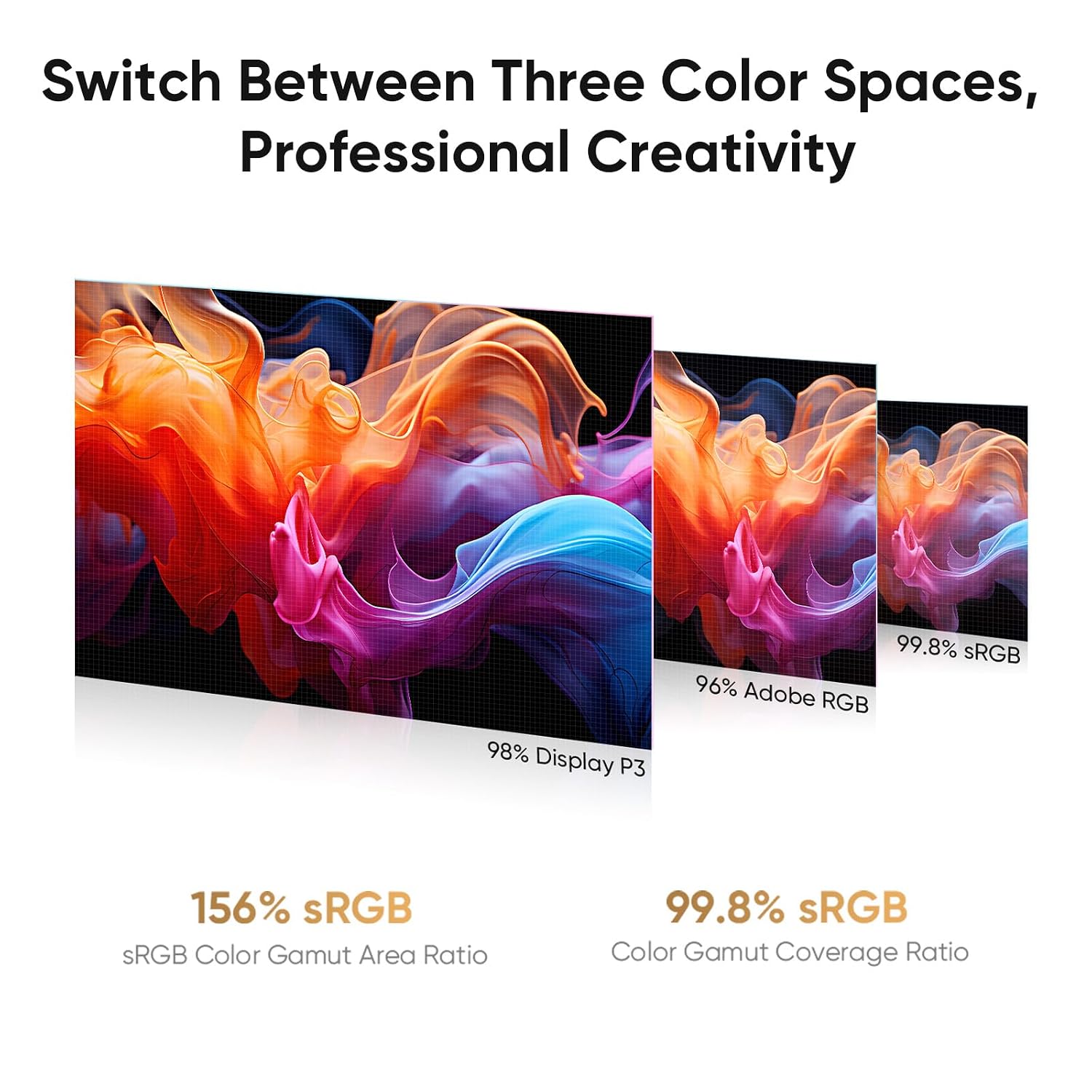
  2. Calman-verified panel rated at ΔE < 1.5, with the feature copy citing 99.8% sRGB, 96% Adobe RGB and 98% Display P3 coverage for color-critical work.
  3. Dual stylus system - the X3 Pro Roller Stylus and the lighter X3 Pro Slim Stylus - both rated at 16384 pressure levels with a 60-degree tilt function that can be switched off in the driver.
  4. AG etched, TÜV SÜD certified anti-glare glass with full lamination, designed to reduce the gap between pen tip and cursor and cut blue-light exposure during long sessions.
  5. ACK05 wireless shortcut keyboard with a physical dial and ten programmable keys, running on Bluetooth 5.0 and recognized with a Good Design Award 2023.
  6. Dual reversible USB-C inputs plus HDMI support and a standard 75x75mm VESA mount, meant to simplify switching between a laptop and desktop.

Strengths and Drawbacks

What works

  • The anti-glare, fully laminated glass feels pleasant to draw on and avoids the visual blur or rainbow shimmer some textured surfaces produce.
  • The stylus is responsive with good line quality and pressure, and shows no lag or input lag.
  • The bundle is generous, including two styluses, 23 extra nibs, a pen case, drawing glove, cleaning cloth, and the ACK05 wireless keydial.
  • Build quality may benefit from sister company Xencelabs and is fairly solid.
  • An upgrade over Wacom at a lower cost.

What does not

  • Touch functionality can be spotty, so some users may not use the touch features.
  • Default tilt sensitivity can feel too aggressive, requiring a trip into the driver settings to turn it off or tune it down.
  • The included cables - both the pen charging cord and the connection cables - run short for some desk setups, forcing furniture rearrangement.
  • The 3-cable connection scheme (power, USB, HDMI) is more cumbersome than a single proprietary cable, and one video card limitation meant a second monitor had to be fully unplugged rather than just turned off.
  • Nibs can wear down fast, with a notable difference after about two weeks.
  • 4K resolution on an 18.4-inch panel may be overkill, occasionally triggering Windows display-scaling quirks in some software.

Features in Depth

01

4K Ultravision Display

Screen Size 18.4 inches Native Resolution 3840x2160 Display Type LCD

The 18.4-inch screen runs at native 3840x2160 resolution, which on a pen display of this size means fine enough pixel density to zoom in on line work or text without the image breaking up. For illustrators and designers, this matters because output destined for large prints or high-resolution screens needs headroom to edit at full detail; a lower-resolution panel forces constant zooming just to check sharpness. The size can feel like the perfect size, with no cramped real estate and no tired arms, which one Cintiq Companion Hybrid upgrader found a true step up. However, 4K may be overkill for a screen this size, and it can trigger Windows resolution-scaling glitches in some programs until a few tweaks are made. Anyone who mainly needs a straightforward, uncluttered canvas rather than pixel-level editing headroom may find the resolution more than they need.

$900.00 4.5/5 Check price
02

Calman Verified Color Accuracy

Color Accuracy ΔE < 1.5 (Calman Verified) sRGB Coverage 99.8% Adobe RGB Coverage 96%

XP-Pen states the panel is Calman-verified with a ΔE under 1.5, a factory calibration standard meant to keep color deviation low enough that what an artist paints on screen closely matches color-managed output elsewhere. The feature copy lists 99.8% sRGB, 96% Adobe RGB, and 98% Display P3 coverage, aimed respectively at web design consistency, print-accurate photo editing, and cinematic color grading. The product title advertises 156% sRGB while the feature copy gives 99.8% sRGB; the manufacturer does not explain the difference, so rely on the ΔE. The color quality is good, the calibration options are a plus, and color accuracy can impress even an untrained eye. This suits photo editors and illustrators who rely on accurate out-of-box color; it offers less to buyers who don't work in color-managed workflows and wouldn't notice the difference.

$900.00 4.5/5 Check price
03

One Paper Design - Anti-Glare Etched Glass

Anti-Glare Glass Yes (AG etched) TÜV SÜD Certified Yes Color Depth 1.07 billion colors

The display uses full-laminated, AG etched glass that is TÜV SÜD certified, intended to close the visual gap between the pen tip and the glass surface and reduce blue-light exposure over long sessions. Full lamination eliminates visual gaps for a seamless drawing experience, closely mimicking paper. The surface feels good to draw on and avoids the blur or rainbow effect of some textured glass, and the matte finish gives a little bit of a paper feel.

$900.00 4.5/5 Check price
04

Dual Stylus and ACK05 Wireless Keydial

Pressure Levels 16384 Tilt Function 60 degrees Keydial Connectivity Bluetooth 5.0

The package includes two pens - the X3 Pro Roller Stylus and the lighter X3 Pro Slim Stylus with removable buttons to prevent accidental touches - both rated at 16384 pressure levels, 3g initial activation force, and a 60-degree tilt function that can be disabled entirely in the driver. The ACK05 shortcut remote adds a physical rotating dial plus ten customizable keys over Bluetooth 5.0, letting an artist keep hands off the keyboard. Low activation force and high pressure-level counts matter because they determine how light a touch registers a mark, which affects how naturally pressure-sensitive shading and line weight feel. The pen is responsive with good pressure and line quality and no input lag, though the tilt can be too sensitive for some and may be turned off.

$900.00 4.5/5 Check price

How We Scored It

Based on
The manufacturer's published specifications and the product's live Amazon listing.
Owner rating
4.5 out of 5 on Amazon, recorded November 1, 2026
Compared against
XPPen Artist Pro 16 Gen2, HUION KAMVAS Pro 19, Wacom Cintiq 16, Huion 24, Wacom Cintiq Companion Hybrid, Huion (unspecified model), on what their Amazon listings state and, where owners compared them, what those owners say.
How we score
We score each thing that comes up most in owner feedback on the XPPen 4K UHD Artist Pro. Eight things come up most in owner feedback: five draw praise and three split opinion. Its ratings average 4.5 stars (78% five stars, 7% four, 6% three and 9% one or two), so every score starts at 90, that average on a 100 point scale. Where opinion is split, we take off 6. Where it draws mostly complaints, we take off 12. Then we read six owner reviews in full (every one we found gave it four or five stars) and move the score up to 5 points either way depending on how the owners who mention it rated the product. Our overall score starts from the same 4.5 star average and loses 0.1 for each thing that draws mostly complaints, with 0.1 more when at least a tenth of ratings are one star, never more than 0.3 in all. Nothing comes off here, so it stays at 4.5. Read our editorial standards

Screen

XP-Pen lists the display type as LCD and the native resolution as 3840x2160. Four of the six owner reviews we read mention it. All of them gave the product four or five stars. Score 95: we started at 90 and added 5 because the owner reviews that mention it are positive.

95Positive

Display

XP-Pen lists the display type as LCD and the native resolution as 3840x2160. Three of the six owner reviews we read mention it. All of them gave the product four or five stars. Score 95: we started at 90 and added 5 because the owner reviews that mention it are positive.

95Positive

Color

XP-Pen lists the color as Dark Silver. Four of the six owner reviews we read mention it. All of them gave the product four or five stars. Score 95: we started at 90 and added 5 because the owner reviews that mention it are positive.

95Positive

Compatibility

Three of the six owner reviews we read mention it, and those owners gave the product four or five stars, so the complaints come from the wider group of buyers. 15% of all ratings are three stars or fewer, which is where complaints like this usually sit. Score 84: we started at 90 and took off 6 because opinion is split.

84Mixed

Responsiveness

One of the six owner reviews we read mentions it, and that owner gave the product four or five stars, so the complaints come from the wider group of buyers. None of the reviews we read say what goes wrong, so this score rests on the buyer ratings. 15% of all ratings are three stars or fewer, which is where complaints like this usually sit. Score 84: we started at 90 and took off 6 because opinion …

Read the full note (409 characters)

One of the six owner reviews we read mentions it, and that owner gave the product four or five stars, so the complaints come from the wider group of buyers. None of the reviews we read say what goes wrong, so this score rests on the buyer ratings. 15% of all ratings are three stars or fewer, which is where complaints like this usually sit. Score 84: we started at 90 and took off 6 because opinion is split.

84Mixed

Connectivity

XP-Pen lists the connectivity technology as 3-in-1 Cable, USB-C to USB-C Cable. Two of the six owner reviews we read mention it, and those owners gave the product four or five stars, so the complaints come from the wider group of buyers. None of the reviews we read say what goes wrong, so this score rests on the buyer ratings. 15% of all ratings are three stars or fewer, which is where complaints …

Read the full note (490 characters)

XP-Pen lists the connectivity technology as 3-in-1 Cable, USB-C to USB-C Cable. Two of the six owner reviews we read mention it, and those owners gave the product four or five stars, so the complaints come from the wider group of buyers. None of the reviews we read say what goes wrong, so this score rests on the buyer ratings. 15% of all ratings are three stars or fewer, which is where complaints like this usually sit. Score 84: we started at 90 and took off 6 because opinion is split.

84Mixed

Owner Satisfaction

78% of ratings are five stars and 7% are four. 6% are three stars and 9% are one or two. The spread skews positive, but enough ratings sit low that the drawbacks below are worth reading. Score 90: its 4.5 star average on a 100 point scale.

90Positive

Value for Money

Five of the six owner reviews we read mention it. All of them gave the product four or five stars. Score 95: we started at 90 and added 5 because the owner reviews that mention it are positive.

95Positive

How It Compares

Alternatives sold on Amazon, with facts from each product's own listing. Prices are Amazon US prices on the date shown and may have changed since.
ModelFrom the listingPrice
XPPen 4K UHD Artist Pro 19 Gen2
  • 18.4 inches screen size
  • 3840x2160 native resolution
  • 16384 pressure levels
$900.00
XPPen Artist Pro 16 Gen24.4 out of 5 · 1,751 ratings on Amazon
  • 16-inch display
  • 2560x1600 QHD resolution
  • 16384 levels
$699.99on Oct 31, 2026
HUION KAMVAS Pro 194.4 out of 5 on Amazon
  • 18.4 inches screen size
  • 3840x2160 native resolution
  • 16384 levels
$877.82on Oct 31, 2026
Wacom Cintiq 164.4 out of 5 · 69 ratings on Amazon
  • 16" IPS display
  • 2560 x 1600
  • 8192 levels
$699.95on Oct 31, 2026
Huion 24 — See price
Wacom Cintiq Companion Hybrid — See price
Huion (unspecified model) — See price

Value check

Worked out from the Amazon prices above; prices change, so check the current price before you buy.

Specifications

Size and weight

Item Dimensions L x W
19"L x 14"W

Materials and warranty

Color
Dark Silver
Warranty Description
15-Month Warranty

Other specifications

Special Feature
4K UHD (3840x2160) resolution, AG etched glass/TÜV SÜD certified, Anti-Glare Glass, Calman Verified/ △E < 1.5, Dual Styl
Connectivity Technology
3-in-1 Cable, USB-C to USB-C Cable
Compatible Devices
Android (USB3.1 DP1.2), ChromeOS 88 (or later), Linux, MacOS 10.13(or later), Windows 7 (or later)

What Buyers Say

Buyers single out the display and the drawing surface as standouts, and appreciate the size, which accommodates two applications at once. Color quality and the calibration options get regular praise. Opinion is mixed on compatibility and connectivity, though the stylus is described as responsive with no input lag.

Based on 296 Amazon customer ratings, averaging 4.5 out of 5, recorded 30 October 2026. See the reviews on Amazon

5 stars 78%
4 stars 7%
3 stars 6%
2 stars 5%
1 stars 4%
★★★★★

Works quite well

Upgraded from a Huion 24, and had a Cintiq before that. Have had this for about a week now. Works well right out of the box. This thing is a behemoth, so make sure you have more than enough … Read it on Amazon
Gee · July 26, 2026 · Verified
★★★★★

A Great Choice

I've been using drawing tablets for years, from the no screen to the screen ones. XPPen is by far one of my favorite brands! I adore this tablet so far, it's huge, and I really love that I c… Read it on Amazon
Jordyn · May 6, 2026 · Verified
★★★★★

Great stand + Bezels. Quality I expect from XP-PEN. Portable despite not being advertised as such

Greatly encourage beginners not comfortable with Wacom’s prices, as well as professionals looking for alternatives, to try this. This can be a stepping stone as much as it can be a long-term… Read it on Amazon
Adriana Giraldo · April 21, 2019 · Verified
★★★★★

Perfect size! You won’t miss Wacom!

Finally replaced my old Wacom cintiq companion hybrid and man is it a true upgrade! Everything works flawlessly, and the texture on the screen is smooth and clean, far more durable than the … Read it on Amazon
Aaron R. · July 28, 2026 · Verified
★★★★★

Nice upgrade from my old Wacom so far! (Windows 10 PC)

As a long time Intuos user, I've always wanted to upgrade to a cintiq, but have always shied away due to the price. Though I work in graphics and design professionally, my illustration and a… Read it on Amazon
S. Hockaday · December 10, 2018 · Verified
★★★★★

Zis tablette is Gigantique!

It’s huge. It works brilliantly, and the color displays super well. For the money, I might have gotten a smaller 4k model but this is great. No input lag. The surface feels good to draw on a… Read it on Amazon
iEnjoyStuff · August 30, 2026 · Verified

Setting It Up

  1. Clear enough desk space before unboxing

    This is a large display, a behemoth that needs more than enough table space. Measure your desk against the stated dimensions before setup so the stand and cables have room, since a cramped desk makes cable routing and stand adjustment harder.

  2. Connect using the provided USB-C or 3-in-1 cable

    Use the USB-C to USB-C cable if your computer supports it, or the 3-in-1 cable otherwise. Check your graphics card supports enough displays; a second monitor may need to be fully unplugged for the tablet to be recognized.

  3. Install the latest drivers rather than relying on an included disc

    Download the current driver from XP-Pen directly; drivers are updated regularly and disc drivers can often fail. One owner uninstalled their Wacom drivers first before installing the XP-Pen driver, and everything went smoothly.

  4. Calibrate pen pressure and tilt in the driver

    Open the driver settings to adjust or disable the 60-degree tilt function. This step matters because the default tilt sensitivity can feel too strong for some drawing styles, and turning it off once avoids having to readjust it for every brush.

  5. Pair the ACK05 keydial over Bluetooth 5.0

    Connect the wireless shortcut remote using its Bluetooth receiver and assign the ten customizable keys to your most-used shortcuts.

  6. Mount or angle the stand to suit your posture

    Use the removable wing-shaped stand for an upright facing-the-screen angle, or remove it and use the standard 75x75mm VESA mount with a monitor arm for eye-level positioning.

Common Questions

Can the XPPen Artist Pro 19 Gen2 be used without a computer?

The manufacturer's own listing note states it is not a standalone drawing tablet and must be connected to a computer or laptop using the included 3-in-1 cable or USB-C cables. It functions as an external pen display, not an independent device. Make sure your computer supports the included connection methods before buying.

Does the screen have touch functionality?

Touch is present but can be spotty, so some users may not use the touch features. It works well with the stylus alone, so touch features can be skipped. If reliable touch gestures are a priority, treat this as a secondary feature rather than a core selling point.

Why does the manufacturer show both '156% sRGB' and '99.8% sRGB'?

The product title advertises 156% sRGB, while the manufacturer's feature description separately states 99.8% sRGB coverage alongside the ΔE.

Will the included cables reach a typical desk setup?

The pen charging cord can be quite short, and the included cords may be short enough that you have to move things around. If your computer sits far from where you will draw, you may need longer cables.

How often do the stylus nibs need replacing?

A difference in nib wear can show after about two weeks, though the screen may stay free of scratches despite months of daily use. The manufacturer says the pen case includes 23 extra nibs (9 for the Slim Stylus, 7 standard and 7 felt for the Roller Stylus) plus a nib extractor.

Is this a good upgrade from a Wacom Cintiq?

It is a true upgrade over a Cintiq Companion Hybrid, with a smooth screen texture and praised color accuracy. It costs more than all three alternatives here, so the case rests on size and color accuracy rather than price. The tradeoffs are the shorter included cables and a multi-cable hookup versus what some expect from a premium display.

On Video

6 videos

XP Pen Artist Pro 19 (Gen 2) Review

Brad Colbow
All videos
  1. XP Pen Artist Pro 19 (Gen 2) Review Brad Colbow
  2. XPPen Artist Pro 19 (2 Gen) - Review Grant Abbitt (Gabbitt)
  3. XPPen 4K Drawing Tablet Review: Best Display Tablet for Artists? The Real Review
  4. Xppen Artist Pro 19 (gen 2) review: The era of 4K pen displays approaches Teoh on Tech
  5. XP-Pen Artist Pro 19 (Gen 2) - I Hope Wacom Is Paying Attention! Adam Duff LUCIDPIXUL
  6. Review: XPPen Artist Pro 19 Gen2 – 4K UHD Drawing Tablet for Professionals Click To Cart

The Verdict

4.5Out of 5

The Artist Pro 19 Gen2's core appeal is straightforward: a genuinely large, Calman-verified 4K display that is an upgrade over Wacom and Huion gear. That's the strength here. The tradeoff is price: it costs more than every alternative in this comparison, including a similarly sized 4K Huion display and smaller QHD options from XPPen and Wacom, so the extra screen real estate and color certification have to be worth paying more for. What keeps it from being a clean recommendation is also the setup experience around the edges - touch response that some call spotty, default tilt sensitivity that needs manual correction, and cables that run shorter than many desks require. These are friction points rather than display-quality problems. For artists prioritizing screen size and color accuracy over the lowest price or absolute plug-and-play simplicity, it delivers on its central promise.

Who should buy it

  • Artists and illustrators who want a large 18.4-inch, color-accurate canvas and cost less than a Wacom.
  • Photo editors and designers who need Calman-verified color with a ΔE
  • Anyone upgrading from a smaller screenless tablet or an older pen display who wants more working real estate for multitasking between reference and canvas.
  • Buyers comfortable adjusting settings rather than expecting zero setup, such as turning overly sensitive tilt off or adjusting color in the drivers.
  • Users who value a generous included accessory bundle (dual styluses, 23 nibs, keydial, glove, case) over buying add-ons separately.

Who should skip it

  • Buyers who need reliable multi-touch gestures, since touch can be spotty.
  • Anyone with a desk setup where the computer sits far from the display, given the short included cables.
  • Users wanting a true plug-and-play experience with no tuning, since tilt can be too sensitive and may need to be turned off.
  • Buyers with very limited desk space, since the 18.4-inch display and stand footprint require considerable room.

A large, color-accurate pen display that earns its praise on screen quality and value but asks buyers to work around short cables, inconsistent touch, and some driver tuning to get there.

Check price on Amazon

More Reviews