4K UHD VA Panel with HDR10
The H32U6 runs a 3840x2160 VA panel rated at a 3000:1 contrast ratio, 300 cd/m2 brightness, and a 125% color gamut figure, with HDR10 support and a manufacturer-stated ΔE
A 31.5-inch 4K VA panel aimed at desks and home studios rather than competitive gaming, the H32U6 pairs a 3000:1 contrast ratio and HDR10 with a fully adjustable white stand. The appeal is obvious on a screen this size at this resolution for the money; the catch is that HDR mode may look washed out and overly bright without manual adjustment.
Buyers shopping a 32-inch 4K monitor usually worry about one of two things: will the picture actually look sharp and rich, or will it just be a big, dim panel with a fancy spec sheet? Here the VA panel delivers genuinely sharp, vivid color for office and creative work with little need to adjust settings out of the box. The twist is that this is a 60Hz panel built for clarity and comfort rather than speed, so anyone expecting high-refresh gaming performance from the HDR10 badge is likely to be disappointed.
NoFussDeal rates the KTC H32U6 White Computer 4.5 out of 5 at $289.99, compared against 4 alternatives sold on Amazon. Last updated November 4, 2026.
The H32U6 runs a 3840x2160 VA panel rated at a 3000:1 contrast ratio, 300 cd/m2 brightness, and a 125% color gamut figure, with HDR10 support and a manufacturer-stated ΔE
The included stand supports height adjustment, tilt, and swivel rotation, built to let the screen be raised, angled, or turned to match seating position rather than fixing it at one fixed height. For a 32-inch display viewed up close at a desk, this range of adjustment matters because an improperly positioned monitor is a common cause of neck and eye strain over long sessions. Low blue light and flicker-free technologies are included for extended office or design work. The matte screen finish suits bright offices better than dim, light-controlled rooms.
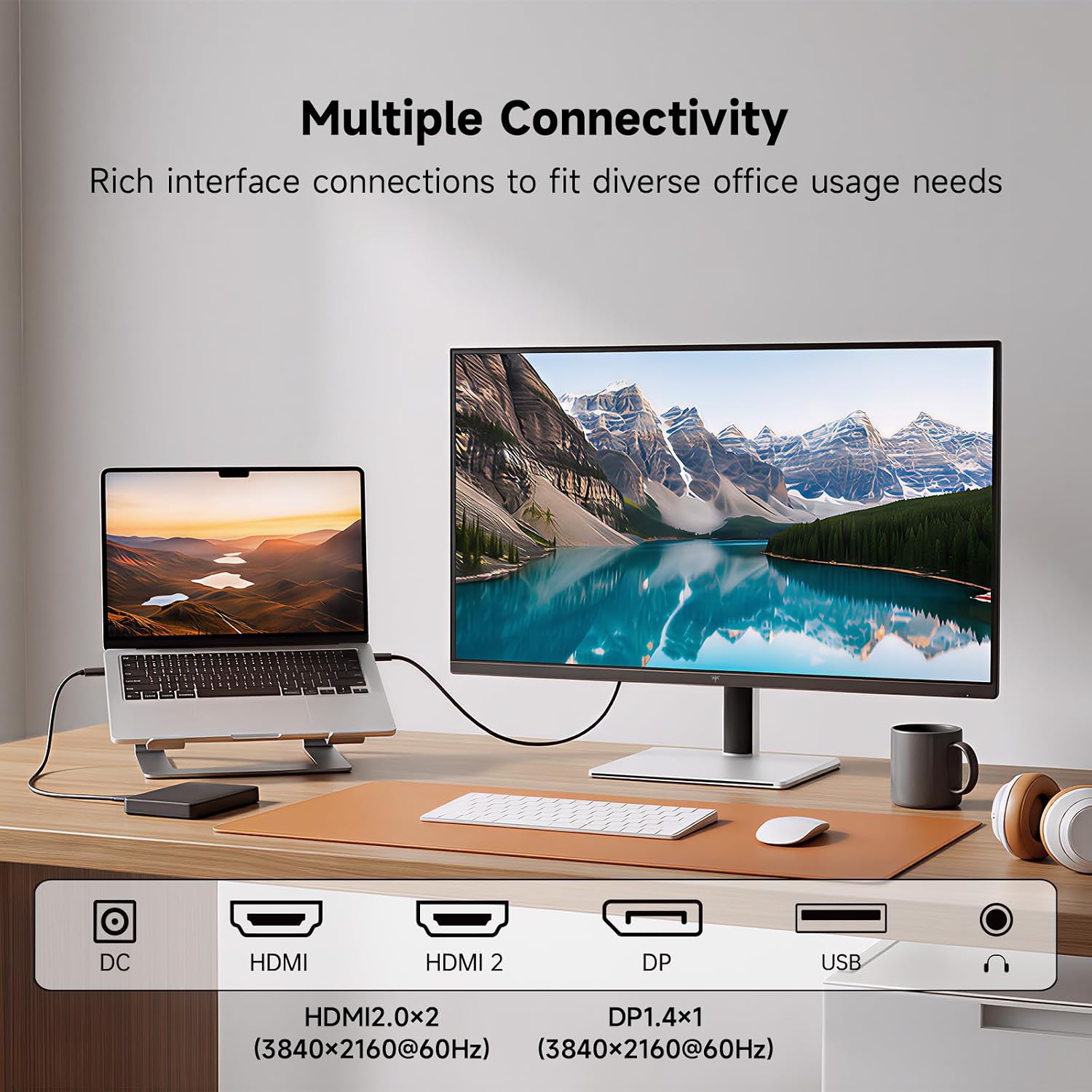
KTC's own feature copy describes two HDMI 2.0 ports and one DisplayPort 1.4 input, both supporting 4K at 60Hz, which is the combination needed to run this panel at its native resolution and refresh rate from most desktops, laptops, and media boxes without an adapter. The published specification table, however, lists only one HDMI port and one DisplayPort output, so buyers relying on a second HDMI connection should confirm the physical port count before assuming dual-HDMI as described in the marketing copy. A single HDMI cable is included in the box. For a monitor pitched at office and entertainment use rather than multi-source gaming setups, one DisplayPort and at least one HDMI input covers the common case of a PC plus a secondary device, though anyone planning to connect three or more sources simultaneously should check port count carefully.
The H32U6 ships in a clean white housing designed to complement light, minimalist desk and home-office setups. It is backed by a 3-year manufacturer warranty, and KTC's customer service can be responsive. Some units may arrive with a stuck pixel or small cluster in the lower corner of the screen; KTC has a pixel guarantee on its website. The box includes the monitor, stand, quick-start guide, and HDMI cable, with no mounting screws included for VESA installs.
Five of the six owner reviews we read mention it. All of them gave the product four or five stars. Score 95: we started at 90 and added 5 because the owner reviews that mention it are positive.
Three of the six owner reviews we read mention it. All of them gave the product four or five stars. Score 95: we started at 90 and added 5 because the owner reviews that mention it are positive.
KTC lists the brightness as 300 cd. Two of the six owner reviews we read mention it. All of them gave the product four or five stars. Score 95: we started at 90 and added 5 because the owner reviews that mention it are positive.
77% of ratings are five stars and 12% are four. 3% are three stars and 8% are one or two. The spread skews positive, but enough ratings sit low that the drawbacks below are worth reading. Score 90: its 4.5 star average on a 100 point scale.
Five of the six owner reviews we read mention it. All of them gave the product four or five stars. Score 95: we started at 90 and added 5 because the owner reviews that mention it are positive.
| Model | From the listing | Price |
|---|---|---|
| KTC H32U6 White Computer |
|
$289.99 |
| LG 32UP83AK-W 32-inch 4K4.4 out of 5 · 179 ratings on Amazon |
|
$304.99on Nov 4, 2026 |
| 32 Inch 4K UHD Monitor IPS 60Hz4.2 out of 5 · 263 ratings on Amazon |
|
$189.99on Nov 4, 2026 |
| Dell 32 Monitor S3225QS4.4 out of 5 · 632 ratings on Amazon |
|
$369.99on Nov 4, 2026 |
| Samsung 37” ViewFinity S7 (S70D)4.5 out of 5 · 98 ratings on Amazon |
|
$394.99on Nov 4, 2026 |
Worked out from the Amazon prices above; prices change, so check the current price before you buy.
Feedback skews strongly positive, with buyers praising sharp, good-looking images straight out of the box and describing the monitor as a bargain for the price. Two buyers used it for audio editing in home studios and report no dead pixels or artifacts. Gaming feedback is positive on smoothness where it is discussed, though one owner found HDR washed out and overly bright without manual tuning, and stuck pixels were reported by two owners.
Based on 2,188 Amazon customer ratings, averaging 4.5 out of 5, recorded 4 November 2026. See the reviews on Amazon
| 5 stars | 77% | |
|---|---|---|
| 4 stars | 12% | |
| 3 stars | 3% | |
| 2 stars | 2% | |
| 1 stars | 6% |
First impressions review of H27T27. They also are selling H27T13. YMMV. I am not a gamer so this is not a review of suitability. Amazing that a display in this price range is even of interes… Read it on AmazonMeloFello · November 27, 2024 · Verified
Typically, i like to wait a bit before reviewing anything i buy online. But honestly, this KTC monitor impressed me for being a budget option at this price point so I’m going to go ahead and… Read it on AmazonEric · December 23, 2022 · Verified
This is actually my second KTC 27-inch monitor, which probably says more than anything else I could put in this review. I liked the first one enough that I bought another, and now I’m rockin… Read it on AmazonJ Phewy · August 31, 2026 · Verified
I've been using this KTC 32" curved monitor for about two weeks now – mostly for FPS gaming and some productivity – and here's my honest breakdown.**What's great:**- The 280Hz refresh rate i… Read it on AmazonAmazon Customer · August 19, 2026 · Verified
I bought a pair of these for my home studio and so far I'm very pleased. They arrived well packaged and in perfect condition. Setup was simple. Plug and play on my PC. And they look great. I… Read it on AmazonCliff Wanner · May 12, 2026 · Verified
I bought one of these for my daughter because it was inexpensive and I was very impressed. There's nothing about it that belies the low price. I bought 2 more for my home recording studio se… Read it on AmazonC. Wanner · August 18, 2026 · Verified
Fit the included stand to the panel on a flat, padded surface before plugging anything in, since a 32-inch screen is awkward to balance upright without support.
Use the DisplayPort 1.4 input or an HDMI 2.0 connection to run the panel at its native 3840x2160 resolution at 60Hz. Mismatched cables or older HDMI standards on the source device can silently cap resolution or refresh rate, so confirm the output device supports 4K at 60Hz before assuming full performance.
Adjust the stand so the screen sits comfortably at eye level, which can reduce the neck strain that comes from looking up or down at a large panel for hours. This is a one-time adjustment worth doing properly rather than relying on the default position.
Inspect the full screen against a plain white and black background as soon as the monitor is set up, since some units may arrive with a stuck pixel or cluster.
If using HDR content, check both the monitor's HDR setting and the operating system's HDR setting, since manual changes in both may be needed to avoid washed-out, overly bright color. Manual adjustment on both ends typically gives a more usable result than the default.
Buyers wanting smooth fast-motion gaming should look at a higher-refresh alternative.
HDR can raise brightness a bit but wash out the colors and look too bright unless settings are adjusted in both the monitor and Windows. Try toggling HDR off for standard work and reserve it for compatible HDR media, adjusting brightness manually if colors look washed out.
Some units may arrive with a stuck pixel or small cluster, reported in the lower right corner of the screen. Check the full screen against plain white and black backgrounds immediately after setup, and contact KTC's customer service if you find a stuck pixel.
Because these two sources disagree, confirm the physical port count on your unit before planning a multi-device setup that relies on two HDMI connections.
Screws on hand may be slightly too long to tighten all the way, though this need not cause stability problems once mounted. Buy VESA-compatible screws matched to your bracket's thickness rather than assuming generic ones will fit perfectly.
Buyers using it for audio editing and studio work report a sharp, clear image with good color, and the maker states a ΔE For professional color grading requiring factory-calibrated accuracy, check whether KTC publishes calibration data, as the manufacturer does not detail a hardware calibration report.
Unboxing My New KTC 32 Inch 4K UHD Monitor! #ad #unboxing #computermonitor #technology
Reviews With Caitlin
Don't Buy Expensive Gaming Monitors... (KTC VS LG)
TA Tech
KTC 32 inch 2k monitor
Dave8d
This Portable 32" 4K Display is Secretly a.. TABLET?! 🤯
Max Tech
Can You Sim Race On A £137 Monitor? | KTC H32S17
Kireth
KTC H32T13 32 Inch 2K 1440p IPS Monitor Unboxing and Review
PBKreviews
The H32U6 earns its strong reputation the straightforward way: a big, sharp 4K VA panel with deep contrast, accurate color, and a genuinely adjustable stand, all wrapped in a clean white finish that suits a tidy desk. Picture quality is praiseworthy for audio editing, with simple plug-and-play setup. The trade-offs are clear once you look past the resolution headline: 60Hz caps it for fast gaming, HDR10 needs manual tuning to avoid looking overdone, and a documentation mismatch over HDMI port count is worth checking before buying. Stuck pixels may be present on arrival, so inspect the screen for them immediately. For its intended lane, desk and media use, it delivers convincingly.
For 4K sharpness and ergonomic comfort at a desk, the H32U6 is a strong, well-reviewed pick; gamers chasing high refresh rates and buyers wanting polished HDR out of the box should look elsewhere.
Check price on Amazon