Never Miss Another Deal!

No Fuss Deal Surprise Me

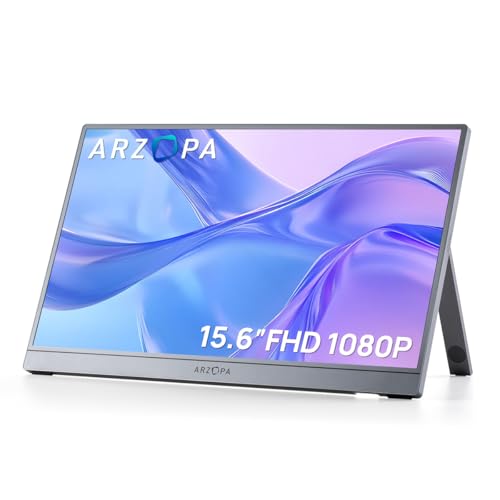
ARZOPA A1 15.6 FHD Review: A Thin, Solid Travel Screen With an Uneven Plug-In Story

A 15.6-inch travel-friendly second screen built to slide into a bag rather than sit on a permanent desk. The thin body and sturdy-feeling kickstand are appealing, but the same plug-and-play promise becomes the biggest complaint when the unit can, in some cases, refuse to be recognized by a laptop.

By ZappyZep, Tech Editor Published September 28, 2026 Updated September 28, 2026
4.4Our score
ARZOPA Portable Monitor 15.6'' FHD 1080P - Ultra-Slim Portable Laptop Monitor with Kickstand - IPS Display for PC, MAC, Phone, Xbox, PS5 - USB C & HDMI Connectivity - A1 Gray ARZOPA Portable Monitor 15.6'' FHD 1080P - Ultra-Slim Portable Laptop Monitor with Kickstand - IPS Display for PC, MAC, Phone, Xbox, PS5 - USB C & HDMI Connectivity - A1 Gray, view 2 ARZOPA Portable Monitor 15.6'' FHD 1080P - Ultra-Slim Portable Laptop Monitor with Kickstand - IPS Display for PC, MAC, Phone, Xbox, PS5 - USB C & HDMI Connectivity - A1 Gray, view 3 ARZOPA Portable Monitor 15.6'' FHD 1080P - Ultra-Slim Portable Laptop Monitor with Kickstand - IPS Display for PC, MAC, Phone, Xbox, PS5 - USB C & HDMI Connectivity - A1 Gray, view 4 ARZOPA Portable Monitor 15.6'' FHD 1080P - Ultra-Slim Portable Laptop Monitor with Kickstand - IPS Display for PC, MAC, Phone, Xbox, PS5 - USB C & HDMI Connectivity - A1 Gray, view 5 ARZOPA Portable Monitor 15.6'' FHD 1080P - Ultra-Slim Portable Laptop Monitor with Kickstand - IPS Display for PC, MAC, Phone, Xbox, PS5 - USB C & HDMI Connectivity - A1 Gray, view 6 ARZOPA Portable Monitor 15.6'' FHD 1080P - Ultra-Slim Portable Laptop Monitor with Kickstand - IPS Display for PC, MAC, Phone, Xbox, PS5 - USB C & HDMI Connectivity - A1 Gray, view 7 ARZOPA Portable Monitor 15.6'' FHD 1080P - Ultra-Slim Portable Laptop Monitor with Kickstand - IPS Display for PC, MAC, Phone, Xbox, PS5 - USB C & HDMI Connectivity - A1 Gray, view 8 ARZOPA Portable Monitor 15.6'' FHD 1080P - Ultra-Slim Portable Laptop Monitor with Kickstand - IPS Display for PC, MAC, Phone, Xbox, PS5 - USB C & HDMI Connectivity - A1 Gray, view 9
Product gallery, 9 images

Prices shown were correct on September 28, 2026 and change frequently.

TL;DRThe Short Answer: Is the ARZOPA A1 15.6 FHD Worth It?

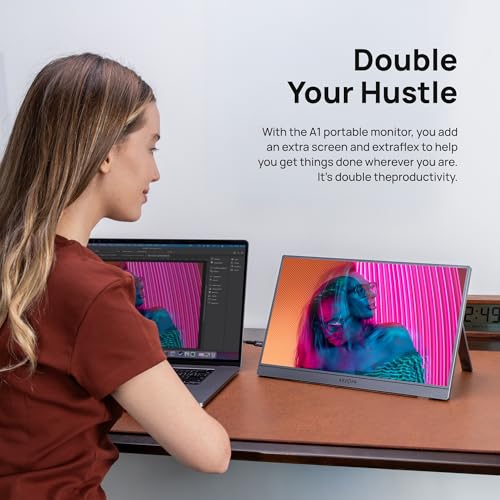
The ARZOPA Portable Monitor 15.6 FHD 1080P is built for people who need a second screen that fits in a backpack, not a permanent office monitor. It is thin and quick to set up alongside a laptop for travel or remote work. The catch: connectivity is where opinion splits hardest, with setup often working the moment a cable is plugged in but, in some cases, the monitor never getting detected.

NoFussDeal rates the ARZOPA A1 15.6 FHD 4.4 out of 5 at $87.99, compared against 4 alternatives sold on Amazon. Last updated September 28, 2026.

Key Facts

Item Dimensions D x W x H
1.5"D x 15"W x 9.5"H
Color
Gray
Item Weight
0.74 kg
Connectivity Technology
USB
Warranty Description
2‑Year Warranty
Brand
ARZOPA

What Stands Out

  1. 15.6-inch 1920x1080 screen with a 178-degree viewing angle and matte finish for shared viewing without heavy glare.
  2. Metal-bodied ultra-slim build with a built-in kickstand that adjusts to your preferred viewing angle.
  3. Three display modes (duplicate, extend, second screen) plus phone connection for using it beyond a laptop setup.
  4. Plug-and-play USB-C and HDMI connectivity with no drivers or app installation required on supported devices.
  5. Built-in speakers so the monitor can handle audio on its own away from a desk setup with external speakers.
  6. A 25 ms response time and 60 Hz refresh rate positioned for everyday productivity and casual entertainment rather than fast gaming.

Strengths and Drawbacks

What works

  • Thin, metal build feels solid and rigid rather than flexy for transport.
  • Kickstand can feel sturdy and adjustable across different surfaces, and the screen can be used both vertically or horizontally depending on the task.
  • Wide 178-degree viewing angle and matte screen make it easy to share the display in bright rooms.
  • Works with laptops from different brands and a Mac Mini without drivers, and the manufacturer claims phone support too.
  • Built-in speakers give a usable audio fallback when external speakers or headphones are not on hand.
  • Lightweight and slim enough to fit into a backpack alongside a laptop for travel or remote work.

What does not

  • Connectivity is not always consistent, and the monitor may fail to be detected at all.
  • At least one setup requires both HDMI and USB-C connected simultaneously to pick up a signal rather than either cable alone.
  • A protective sleeve may not be included, leaving the screen exposed unless a case is bought separately.
  • 60 Hz refresh rate and 25 ms response time make it a fit for productivity and casual entertainment rather than fast-paced gaming.
  • Functionality and connectivity overall draw mixed feedback rather than uniform praise.

Features in Depth

01

1920x1080 IPS-Style Display with Wide Viewing Angle

Resolution 1920 x 1080 Viewing Angle 178 degrees Brightness 300 cd/m2

The panel runs a native 1920x1080 resolution with a 178-degree viewing angle, a matte screen finish, 300 cd/m2 brightness, and a 1200:1 contrast ratio, all specified by ARZOPA. The manufacturer's feature copy describes it as an IPS screen, though the specification table separately lists the display type as LCD - a contradiction worth flagging rather than resolving one way. For a second screen used for documents, video calls, or streaming, a wide viewing angle matters because it lets a colleague glance at the screen from the side without the image washing out, and the matte coating cuts glare in bright rooms. Working with a Mac Mini and a Windows laptop, the colors can appear attractive and the image excellent on both, at no more than 50 percent brightness even in well-lit indoor spaces. It may be best kept to indoor spaces rather than direct outdoor sun. This suits office and entertainment use well; gamers chasing motion clarity should look elsewhere given the 60 Hz refresh rate.

$87.99 4.4/5 Check price
02

Ultra-Slim Metal Build with Adjustable Kickstand

Weight 0.74 kg Thickness 0.35 inch Kickstand Yes

ARZOPA specifies a body built from metal materials with an integrated kickstand, a 0.74 kg weight, and a thickness of 0.35 inch per the manufacturer's own copy. A rigid metal chassis matters on a portable monitor because thin plastic panels tend to flex and can distort the image when carried in a bag daily; a stiffer frame better survives repeated packing and travel. The build feels high quality and solid, and the rigidity can give confidence it will not bend or warp with handling. The kickstand can be sturdy and adjustable enough to work across different surfaces, and the screen can be used both vertically and horizontally, with horizontal possibly easier for multitasking and vertical suiting long documents. A protective sleeve may not be included, so anyone carrying it loose in a bag should budget for a case separately.

$87.99 4.4/5 Check price
03

Multiple Display Modes and Plug-and-Play Connectivity

Ports USB-C, HDMI Driver Install Required No Display Modes Duplicate, Extend, Second Screen

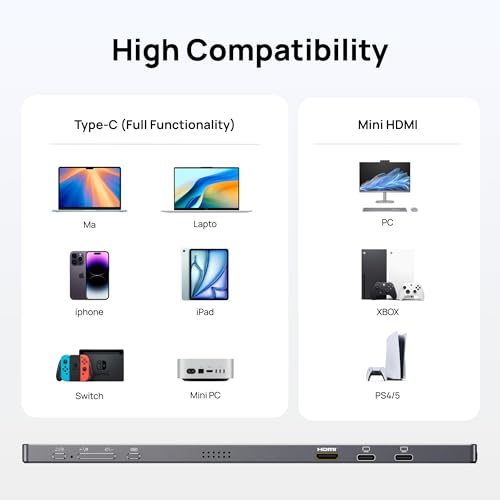
The monitor offers duplicate, extend, and second-screen display modes, connects via USB-C or HDMI, and ARZOPA states no app or driver installation is required across laptops, PCs, Macs, phones, Xbox, PS5, and Switch. This flexibility matters because a travel monitor is only as useful as its ability to work instantly with whatever device is on hand that day. It can work as advertised, with seamless switching between different laptop brands and a quick, simple plug-in setup. However, functionality and connectivity draw mixed feedback overall: the monitor can require both the HDMI and USB-C cables connected at the same time rather than either alone to pick up a signal, and it can fail to be detected at all despite following the setup steps. Anyone relying on a single-cable connection every time should be aware this can be inconsistent.

$87.99 4.4/5 Check price
04

Built-In Speakers for Standalone Audio

Built-In Speakers Yes Flicker-Free Yes Warranty 2 years

ARZOPA lists built-in speakers as a feature, letting the monitor output sound without a separate audio setup. This matters most away from a desk, where plugging in external speakers or always reaching for headphones is not practical. The built-in monitor audio can be good enough for music or presentations when out of the house without headphones or dedicated speakers readily available. This is a convenience feature rather than a high-fidelity one, and the manufacturer does not publish wattage or frequency specifications for the speakers, so buyers wanting rich sound for entertainment should still plan to pair external audio for anything beyond casual listening.

$87.99 4.4/5 Check price

How We Scored It

Based on
The manufacturer's published specifications and the product's live Amazon listing.
Owner rating
4.4 out of 5 on Amazon, recorded September 28, 2026
Compared against
15.6” Portable Monitor, UPERFECT Portable Monitor 15.6", InnoView Portable Monitor, Ingnok Portable Monitor, on what their Amazon listings state and, where owners compared them, what those owners say.
How we score
We score each thing that comes up most in owner feedback on the ARZOPA Portable Monitor 15.6'' FHD 1080P. Six things come up most in owner feedback: four draw praise and two split opinion. Its ratings average 4.4 stars (76% five stars, 13% four, 1% three and 10% one or two), so every score starts at 88, that average on a 100 point scale. Where opinion is split, we take off 6. Where it draws mostly complaints, we take off 12. Then we read eight owner reviews in full, including the critical ones, and move the score up to 5 points either way depending on how the owners who mention it rated the product. Our overall score starts from the same 4.4 star average and loses 0.1 for each thing that draws mostly complaints, with 0.1 more when at least a tenth of ratings are one star, never more than 0.3 in all. Nothing comes off here, so it stays at 4.4. Read our editorial standards

Quality

Its thin design and quality stand out. Three of the eight owner reviews we read mention it. All of them gave the product four or five stars. Score 93: we started at 88 and added 5 because the owner reviews that mention it are positive.

93Positive

Easy

Three of the eight owner reviews we read mention it. Two gave the product four or five stars and one gave it three or fewer. Score 90: we started at 88 and added 2 because the owner reviews that mention it are positive.

90Positive

Portability

ARZOPA lists the item dimensions d x w x h as 1.5"D x 15"W x 9.5"H and the item weight as 0.74 kg. Three of the eight owner reviews we read mention it. All of them gave the product four or five stars. Score 93: we started at 88 and added 5 because the owner reviews that mention it are positive.

93Positive

Thin

Three of the eight owner reviews we read mention it. All of them gave the product four or five stars. Score 93: we started at 88 and added 5 because the owner reviews that mention it are positive.

93Positive

Functionality

None of the eight owner reviews we read mention it. 11% of all ratings are three stars or fewer, which is where complaints like this usually sit. Score 82: we started at 88 and took off 6 because opinion is split.

82Mixed

Connectivity

ARZOPA lists the connectivity technology as USB and the hardware connectivity as HDMI, USB. Two of the eight owner reviews we read mention it. One gave the product four or five stars and one gave it three or fewer. 11% of all ratings are three stars or fewer, which is where complaints like this usually sit. Score 82: we started at 88 and took off 6 because opinion is split.

82Mixed

Owner Satisfaction

76% of ratings are five stars and 13% are four. 1% are three stars and 10% are one or two. The spread skews positive, but enough ratings sit low that the drawbacks below are worth reading. One of the eight owner reviews we read gave it three stars or fewer. We look for the critical ones on purpose. Score 88: its 4.4 star average on a 100 point scale.

88Positive

How It Compares

Alternatives sold on Amazon, with facts from each product's own listing. Prices are Amazon US prices on the date shown and may have changed since.
ModelFrom the listingPrice
ARZOPA A1 15.6 FHD
  • 1920 x 1080 resolution, 178° viewing angle
  • Weighing only 1.6lb, thickness 0.35-inch
  • Contrast Ratio: 1200:1
$87.99
15.6” Portable Monitor4.3 out of 5 · 214 ratings on Amazon
  • 0.23” thin and 1.26 pounds light
  • 1920x1080P full HD resolution, 1000:1 contrast ratio
  • 100% sRGB color gamut
$85.48on Sep 27, 2026
UPERFECT Portable Monitor 15.6"4.5 out of 5 · 1,435 ratings on Amazon
  • as slim as 0.23" and weight of just 1.4 lbs
  • 125% sRGB wide color gamut
  • 350nits brightness
$65.99on Sep 27, 2026
InnoView Portable Monitor4.3 out of 5 · 6,250 ratings on Amazon
  • resolution of 1920*1080P
  • 178° full viewing angle
  • 2 full-function Type-C ports and 1 HDMI port
$63.99on Sep 27, 2026
Ingnok Portable Monitor4.4 out of 5 · 3,816 ratings on AmazonRead our review →
  • 1920x1080 resolution
  • weighs just 1.44LB
  • Contrast Ratio: 1200:1
$69.99on Sep 27, 2026

Value check

Worked out from the Amazon prices above; prices change, so check the current price before you buy.

Specifications

Size and weight

Item Dimensions D x W x H
1.5"D x 15"W x 9.5"H
Item Weight
0.74 kg

Materials and warranty

Color
Gray
Warranty Description
2‑Year Warranty

Other specifications

Connectivity Technology
USB
Brand
ARZOPA

What Buyers Say

Feedback leans strongly positive on portability and build: the thin profile comes up again and again, and the kickstand is described as sturdy and adjustable. Image quality for office work also draws praise, and it can suit watching video too. Where opinion splits is connectivity - several report a seamless plug-and-play connection across different laptop brands, but the monitor can, in some cases, fail to be detected at all, or need both HDMI and USB-C connected simultaneously to pick up a signal.

Based on 127 Amazon customer ratings, averaging 4.4 out of 5, recorded 28 September 2026. See the reviews on Amazon

5 stars 76%
4 stars 13%
3 stars 1%
2 stars 3%
1 stars 7%
★★★★★

Bueno para trabajar, práctico para transportar

Muy práctica para el transporte; solo necesitas la pantalla y el cable de video. Lo he usado con el cable tipo C, siendo la opción plug and play que transmite video, y en dispositivos donde … Read it on Amazon
Daniel Santanilla · May 17, 2026 · Verified
★★★★★

The Right Size Second Monitor

This is perfect size monitor for traveling or remote work. I use a 15 and 17 inch laptop and this size works well with both those sizes as a second monitor. the hook up is seamless and the t… Read it on Amazon
Dave Mounce · April 27, 2026 · Verified
★★★★★

Reliable and Portable Monitor for Everyday Work

Good portable monitor for everyday work. This ARZOPA monitor does exactly what I needed, simple setup, easy to carry, and the screen is clear enough for productivity tasks.It also feels soli… Read it on Amazon
Ana zapata · April 17, 2026 · Verified
★★★★★

Really thin monitor

Love this thin monitor. It fits perfect with my new lap desk. SAIJI Laptop Lap Desk with External Monitor Holder Fits Up to 17" Laptops. Highly recommend
K Moss · August 1, 2026 · Verified
★★★★★

LOVE IT !!!

“I love this! Anything quick and easy with a simple plug-in setup is perfect for me — I’m in!”
Shygirl · May 25, 2026 · Verified
★★★★★

Great portable Monitor

Great for working on the move! The monitor has a super nice build quality and great display.
Tomas · May 11, 2026 · Verified

Setting It Up

  1. Choose the right cable for your device

    Connect via USB-C for a single-cable video connection on supported laptops and phones, or HDMI for devices without USB-C video output. A signal can fail to register on a single cable alone in some setups, requiring both HDMI and USB-C connected together.

  2. Set up the kickstand before powering on

    Extend the built-in kickstand and set the angle on a stable surface before connecting cables. Adjusting position after the monitor is already connected risks straining the cable connection at the port.

  3. Select the display mode on your source device

    Choose duplicate, extend, or second-screen mode from the connected laptop, PC, or phone's display settings. This determines whether the ARZOPA mirrors the main screen or acts as separate desktop space.

  4. If the monitor is not detected, try both cables at once

    In some cases a signal only registers when HDMI and USB-C are connected simultaneously rather than a single cable. If the screen stays blank on one cable, try connecting the second before assuming a fault.

  5. Adjust brightness for the room, not to maximum

    Lower brightness (up to 50 percent has proven enough indoors in some cases) rather than running it at maximum, which preserves visibility without unnecessary glare in enclosed spaces; it may be best kept out of direct outdoor sun.

Common Questions

Does the ARZOPA A1 15.6 FHD 1080P work with a phone as well as a laptop?

Yes, ARZOPA states it supports phone connection through a dedicated phone mode alongside desktop-style extend and duplicate modes. It uses the same USB-C or HDMI connection as with a laptop, with no app or driver installation required on supported devices. Check that your phone supports video-out over USB-C before relying on this, since not all phones do.

Why won't my ARZOPA portable monitor connect to my laptop?

Connection issues can vary: in some cases both HDMI and USB-C need to be connected simultaneously to get a signal, while in others the monitor could not be detected at all despite following the setup steps on multiple laptops. If a single cable does not work, try connecting both, and test on a second device to rule out a faulty unit before assuming user error.

Does the ARZOPA A1 have a built-in battery?

The manufacturer's specifications do not list a built-in battery. The manufacturer does not explain how the monitor is powered, so check power requirements with ARZOPA before relying on it with a battery-powered laptop.

Is this monitor good for gaming with a PS5 or Xbox?

It is compatible with PS5, Xbox, and Switch through HDMI or USB-C, and works for casual and entertainment use.

Is the ARZOPA IPS or LCD panel?

ARZOPA's own feature description calls it an IPS screen, but the published specification table separately lists the display type as LCD. This is an inconsistency in the manufacturer's own listing rather than a confirmed answer either way, so buyers who need a specific panel type confirmed should contact ARZOPA directly before purchase.

Does it come with a case or sleeve to protect the screen while traveling?

The manufacturer does not mention a case, and one may not be included, though a sleeve already owned can serve as a substitute. Since the screen is exposed to scratches when packed loosely in a bag, buying a dedicated sleeve separately is worth doing if you plan to travel with it regularly.

On Video

6 videos

The Best Portable Monitor - ARZOPA A1M FHD

The Hippie Hacker
All videos
  1. The Best Portable Monitor - ARZOPA A1M FHD The Hippie Hacker
  2. ARZOPA 16.1" Portable Monitor Review Daily Unboxer
  3. Arzopa A1 15.6" Portable Monitor Full Review Dashunthetruth
  4. Unboxing the ARZOPA 15.6in 1080p Portable Monitor DevonDoesTech
  5. The BEST Portable Monitor for Switch?🤔🔥 | Arzopa Z1FC Review & Gameplay ARZOPA
  6. I was just sent The Arzopa A1 15.6 inch Portable Monitor and this thing is a amazing #gift #holiday Frankie_aka

The Verdict

4.4Out of 5

The ARZOPA A1 15.6 FHD 1080P does what a portable monitor needs to do first: it is thin, light, and sturdy enough to handle being moved around often, with a kickstand and wide viewing angle that hold up for shared viewing on the road. Image quality for office work draws praise and can suit video and casual entertainment too, and the build is described as solid and durable. The trade-off sits squarely in connectivity - while seamless plug-and-play across different laptop brands is reported, the monitor can in some cases fail to be detected or need both HDMI and USB-C at once, and the manufacturer's own listing even contradicts itself on whether the panel is IPS or LCD. At a price above all of the alternatives it sits alongside, it is competing on build feel and screen quality rather than on being the cheapest option in its class. That makes it a reasonable pick for someone who values a solid feel and simple daily use over squeezing out every dollar of value, but not a monitor to buy expecting flawless plug-and-play every time.

Who should buy it

  • Remote workers and travelers who need a lightweight second screen that holds up to being moved around often.
  • Buyers who prioritize build quality and a sturdy kickstand over chasing the lowest price.
  • Anyone connecting across multiple device types - laptop, Mac, phone, or console - without wanting to install drivers.
  • It suits users doing document work or entertainment rather than gaming, as it holds up well for working and watching videos.

Who should skip it

  • Gamers who need higher refresh rates or faster response times than 60 Hz and 25 ms allow.
  • Buyers who cannot tolerate any risk of a detection issue on setup, given the mixed connectivity feedback.
  • Anyone needing a confirmed IPS panel, given the manufacturer's own listing is inconsistent on panel type.
  • Budget-focused buyers, since it costs more than every listed alternative in its class.

Buy it for its thin, well-built travel design and solid everyday screen quality, but go in aware that connectivity can be inconsistent and test the connection immediately after purchase.

Check price on Amazon

More Reviews