Never Miss Another Deal!

No Fuss Deal Surprise Me

MNN 15.6 Portable Monitor Review: A Capable Travel Screen With One Known Quirk

A 15.6-inch USB-C portable monitor aimed at travelers, remote workers and console gamers who want a second screen that folds into a laptop bag. It delivers sharp 1080p color and single-cable setup at a low cost, but its built-in speakers and a quirky no-signal shutoff mean it suits document work and casual play more than a dedicated gaming rig.

By ZappyZep, Tech Editor Published September 30, 2026 Updated September 30, 2026
4.3Our score
MNN 15.6" FHD 60Hz Portable Monitor USB-C HDMI IPS HDR Gaming Laptop MNN 15.6" FHD 60Hz Portable Monitor USB-C HDMI IPS HDR Gaming Laptop, view 2 MNN 15.6" FHD 60Hz Portable Monitor USB-C HDMI IPS HDR Gaming Laptop, view 3 MNN 15.6" FHD 60Hz Portable Monitor USB-C HDMI IPS HDR Gaming Laptop, view 4 MNN 15.6" FHD 60Hz Portable Monitor USB-C HDMI IPS HDR Gaming Laptop, view 5 MNN 15.6" FHD 60Hz Portable Monitor USB-C HDMI IPS HDR Gaming Laptop, view 6 MNN 15.6" FHD 60Hz Portable Monitor USB-C HDMI IPS HDR Gaming Laptop, view 7 MNN 15.6" FHD 60Hz Portable Monitor USB-C HDMI IPS HDR Gaming Laptop, view 8
Product gallery, 8 images

Prices shown were correct on September 30, 2026 and change frequently.

TL;DRThe Short Answer: Is the MNN 15.6 Portable Monitor Worth It?

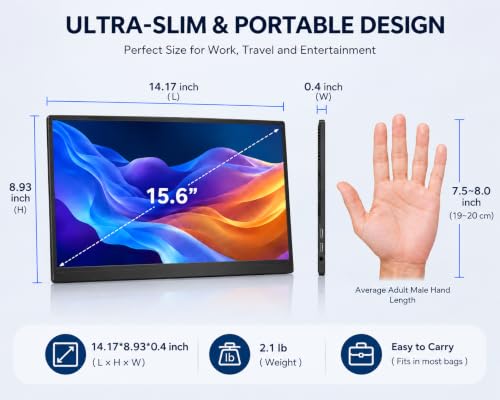
Anyone who has lugged a second monitor through an airport knows the tradeoff: bigger screen, heavier bag. This 15.6-inch panel tries to solve that with a 1.5-pound body, a fold-out smart cover that doubles as a stand, and one USB-C cable for both power and video. The one quirk worth knowing about is a built-in no-signal timeout that can, on certain systems, strand the screen mid-boot - rare, but worth watching for.

NoFussDeal rates the MNN 15.6 Portable Monitor 4.3 out of 5 at $43.81, compared against 4 alternatives sold on Amazon. Last updated September 30, 2026.

Key Facts

Item Dimensions D x W x H
20"D x 2"W x 22"H
Voltage
5 volts
Color
Matte black
Item Weight
1.5 pounds
Connectivity Technology
USB
Compatible Devices
Tablet

What Stands Out

  1. 15.6-inch Full HD (1920x1080) IPS panel with a 178-degree viewing angle, which the manufacturer says renders accurate and bright color.
  2. Dual USB-C ports support single-cable plug-and-play video and power on laptops, phones, and consoles with USB 3.1 DP Alt Mode or Thunderbolt 3.
  3. Mini HDMI input adds compatibility with older laptops and consoles that lack USB-C video output, though HDMI mode still needs separate USB-C power.
  4. A PU-leather smart cover doubles as a stand and protects the screen in transit, and the monitor works in landscape or portrait orientation.
  5. HDR picture mode and FreeSync adaptive sync are included for brighter highlights and smoother motion in supported content.
  6. At 1.5 pounds and a slim profile, it is light enough to add to a laptop bag without feeling like a second device.

Strengths and Drawbacks

What works

  • Single USB-C cable handles both power and video on supported laptops, phones and consoles, cutting setup to a plug-and-play connection.
  • IPS panel with a 178-degree viewing angle and 300 cd/m2 brightness delivers vibrant, sharp color for document work, video and casual gaming.
  • At 1.5 pounds with a fold-out smart cover, it slides into a laptop bag or backpack without adding noticeable bulk for travel.
  • Comes with both a USB-C to USB-C cable and a mini HDMI cable, so most laptops and consoles are covered without buying extras.
  • On signal loss it can drop into a power-saving mode and wait for the signal to return rather than going into a panic state.

What does not

  • Built-in speakers are only adequate, lacking bass, so serious media or gaming audio still needs headphones or external speakers.
  • No USB-C power adapter is included, so HDMI-only connections to devices without USB-C power require sourcing a separate charger.
  • Durability is mixed: it can feel very sturdy, though in some cases it doesn't last long.
  • The fold-out smart cover can take a moment to position securely and may slip if not seated properly.

Features in Depth

01

15.6-inch FHD IPS Display with HDR

Resolution 1920 x 1080 Brightness 300 cd/m2 Viewing Angle 178 degrees

The panel is a 1920x1080 IPS display with a 178-degree viewing angle, 1000:1 contrast ratio, matte finish, and a manufacturer-rated brightness of 300 cd/m2. IPS technology preserves color accuracy off-axis, which matters when a second person is looking at the screen from the side during a shared work session. An HDR picture mode is available to boost highlights and color depth in supported content. The picture is bright, crisp, and vibrant, with color quality sometimes comparable to costlier dedicated monitors. A 60Hz refresh rate and 5-millisecond response time make it adequate for document work, video, and casual console gaming, though a higher-refresh panel would serve dedicated gamers better.

$43.81 4.3/5 Check price
02

Dual USB-C Ports with Single-Cable Plug and Play

Ports 2x USB-C, 1x Mini HDMI Power Input 5 volts Cables Included USB-C to USB-C, Mini HDMI

Two full-function USB-C ports handle both power delivery and video signal, so a single Type-C cable can connect the monitor to a laptop, MacBook, phone, PS5, PS4, Xbox, or Switch, provided the source device supports Thunderbolt 3.0 or USB 3.1 DP Alt Mode. This single-cable approach avoids running separate power and video leads. With a MacBook Air M1, one USB-C port can be used for video and the other for power, video may be recognized instantly, and which port is used may not matter. The included 1.0-meter Type-C cable and 1.0-meter mini HDMI cable cover most laptop and console scenarios. A limitation worth noting: when using the mini HDMI input, the monitor still requires separate USB-C power, and no USB-C power adapter is included, so a compatible charger must be sourced separately for HDMI-only setups.

$43.81 4.3/5 Check price
03

Smart Cover, Weight, and Multi-Orientation Stand

Weight 1.5 pounds Display Modes Copy, Extended, Second Screen, Portrait Mounting Desk Mount / VESA

A PU-leather smart cover doubles as a fold-out stand and protects the screen in transit, while the monitor itself works in landscape or portrait and offers copy, extended and second-screen display modes. At 1.5 pounds total weight, the monitor with its cover attached is light enough to add to a backpack alongside a laptop without meaningfully increasing bag weight, making it a practical travel companion. VESA mounting is available once the cover is removed, adding a desk-mount option beyond the folding stand. The smart cover stand can take a moment to position securely so it does not slip. Durability is mixed: the build can feel very sturdy, though in some cases it doesn't last long, so it is worth handling with care in transit.

$43.81 4.3/5 Check price
04

Built-In Speakers and No-Signal Auto Shutoff

Speakers Built-in, stereo Auto Shutoff Timer Fixed, not adjustable Power Source USB-C from host device

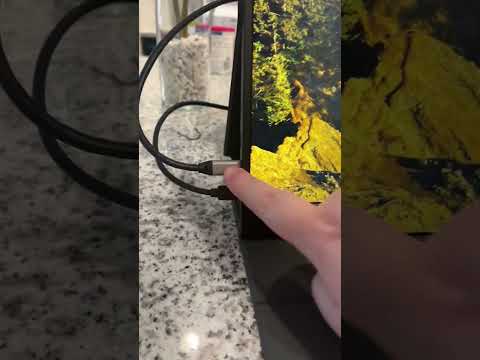
The monitor includes built-in speakers that may sound clear with okay volume but little bass, and can be only adequate for quick clip previews, with headphones or external speakers preferred for serious media. A more consequential behavior is a no-signal auto shutoff: the screen powers down automatically after a short timer when video data is absent, a fixed setting that cannot be adjusted or disabled in the electronics programming. On certain operating systems, the handoff between BIOS startup and the operating system can briefly drop the data signal, and if that gap runs long enough, the auto shutoff triggers and the monitor may not restart because it lacks the display data it needs. In at least one case support sent a replacement unit free of charge, though the same behavior recurred, suggesting a programming characteristic rather than a one-off defect. This issue does not affect every operating system or setup, but buyers who need guaranteed uptime through every boot cycle should be aware of it.

$43.81 4.3/5 Check price

How We Scored It

Based on
The manufacturer's published specifications and the product's live Amazon listing.
Owner rating
4.3 out of 5 on Amazon, recorded September 30, 2026
Compared against
InnoView Portable Monitor 15.6 FHD, ARZOPA A1 Gray 15.6 FHD, UPERFECT Portable Monitor 15.6, Ingnok Portable Monitor 15.6, on what their Amazon listings state and, where owners compared them, what those owners say.
How we score
We score each thing that comes up most in owner feedback on the MNN 15.6" FHD 60Hz Portable Monitor. Eight things come up most in owner feedback: seven draw praise and one splits opinion. Its ratings average 4.3 stars (71% five stars, 11% four, 5% three and 13% one or two), so every score starts at 86, that average on a 100 point scale. Where opinion is split, we take off 6. Where it draws mostly complaints, we take off 12. Then we read eight owner reviews in full (every one we found gave it four or five stars) and move the score up to 5 points either way depending on how the owners who mention it rated the product. Our overall score starts from the same 4.3 star average and loses 0.1 for each thing that draws mostly complaints, with 0.1 more when at least a tenth of ratings are one star, never more than 0.3 in all. Nothing comes off here, so it stays at 4.3. Read our editorial standards

Portability

MNN lists the item dimensions d x w x h as 20"D x 2"W x 22"H and the item weight as 1.5 pounds. Seven of the eight owner reviews we read mention it. All of them gave the product four or five stars. Score 91: we started at 86 and added 5 because the owner reviews that mention it are positive.

91Positive

Picture

MNN lists the picture quality enhancement technology as HDR. Three of the eight owner reviews we read mention it. All of them gave the product four or five stars. Score 91: we started at 86 and added 5 because the owner reviews that mention it are positive.

91Positive

Setup

Six of the eight owner reviews we read mention it. All of them gave the product four or five stars. Score 91: we started at 86 and added 5 because the owner reviews that mention it are positive.

91Positive

Lightweight

Five of the eight owner reviews we read mention it. All of them gave the product four or five stars. Score 91: we started at 86 and added 5 because the owner reviews that mention it are positive.

91Positive

Connectivity

MNN lists the connectivity technology as USB and the hardware connectivity as USB Type C. Seven of the eight owner reviews we read mention it. All of them gave the product four or five stars. Score 91: we started at 86 and added 5 because the owner reviews that mention it are positive.

91Positive

Durability

MNN lists the warranty description as 2 Year. None of the eight owner reviews we read mention it. 18% of all ratings are three stars or fewer, which is where complaints like this usually sit. Score 80: we started at 86 and took off 6 because opinion is split.

80Mixed

Owner Satisfaction

71% of ratings are five stars and 11% are four. 5% are three stars and 13% are one or two. A sizable share of ratings sit low, so weigh the drawbacks below as heavily as the praise. Score 86: its 4.3 star average on a 100 point scale.

86Mostly Positive

How It Compares

Alternatives sold on Amazon, with facts from each product's own listing. Prices are Amazon US prices on the date shown and may have changed since.
ModelFrom the listingPrice
MNN 15.6 Portable Monitor
  • 15.6 inch, 1920x1080 resolution
  • 300 brightness
  • 178° viewing angle
$43.81
InnoView Portable Monitor 15.6 FHD4.3 out of 5 · 6,252 ratings on AmazonRead our review →
  • 15.6 inch, 1920*1080P resolution
  • 250 cd brightness
  • 178° full viewing angle
$63.99on Sep 29, 2026
ARZOPA A1 Gray 15.6 FHD4.4 out of 5 · 127 ratings on AmazonRead our review →
  • 15.6 inches, 1920 x 1080 resolution
  • 300 candela_per_square_meter brightness
  • 178 degrees viewing angle
$87.99on Sep 28, 2026
UPERFECT Portable Monitor 15.64.5 out of 5 · 1,435 ratings on AmazonRead our review →
  • 15.6 inches, 1920x1080 resolution
  • 350 cd brightness
  • 125% sRGB color gamut
$65.99on Sep 29, 2026
Ingnok Portable Monitor 15.64.4 out of 5 · 3,816 ratings on AmazonRead our review →
  • 15.6 inch, 1920x1080 resolution
  • 300 cd brightness
  • 178 degrees viewing angle
$69.99on Sep 27, 2026

Value check

Worked out from the Amazon prices above; prices change, so check the current price before you buy.

Specifications

Size and weight

Item Dimensions D x W x H
20"D x 2"W x 22"H
Item Weight
1.5 pounds

Power

Voltage
5 volts

Materials and warranty

Color
Matte black

Other specifications

Connectivity Technology
USB
Compatible Devices
Tablet

What Buyers Say

Feedback consistently praises portability, picture quality and how quickly the monitor sets up over a single USB-C cable, with several buyers noting it comes with all the cables needed out of the box. Opinion splits on durability: some customers find it very sturdy, while others report it doesn't last long. Built-in speakers draw mild criticism as merely adequate rather than good, and a no-signal auto-shutoff can, in some cases, prevent the screen from restarting after certain operating system boot sequences.

Based on 12,612 Amazon customer ratings, averaging 4.3 out of 5, recorded 29 September 2026. See the reviews on Amazon

5 stars 71%
4 stars 11%
3 stars 5%
2 stars 3%
1 stars 10%
★★★★★

AWESOME FOR: 2nd travel work monitor mainly for document work, for laptop

It is key to know what you want this for. I'm not a gamer so this review is only from perspective of someone who works on documents all day, logged into an office remotely. So I needed a por… Read it on Amazon
David S. Drobner · November 25, 2023 · Verified
★★★★★

Great portable Monitor for Work and Entertainment

I’m really impressed with this portable monitor. The 15.6-inch Full HD display looks bright and clear, and the colors are beautiful. It’s lightweight, easy to carry, and the smart cover make… Read it on Amazon
Mailin · September 24, 2026 · Verified
★★★★★

MNN 15.6" FHD 60Hz Portable Monitor USB-C HDMI IPS HDR Gaming Laptop

MNN 15.6" FHD 60Hz Portable Monitor USB-C HDMI IPS HDR Gaming LaptopThis is a very compact screen, for laptop or computer with HDMI connections.It runs off of power from the computer, it doe… Read it on Amazon
Runion · August 20, 2026 · Verified
★★★★★

Incredible Value for the Price!

I honestly wasn't expecting to be this impressed, especially at this price point. From the moment I plugged it in, it was truly plug-and-play. Within seconds I was up and running without hav… Read it on Amazon
Robert B. Kelly · July 2, 2026 · Verified
★★★★★

Great purchase!

Excellent buy. I use this monitor almost daily - for work and as a student. It is lightweight, super portable, and doesn't require a separate power source other than the cord (included) to c… Read it on Amazon
Jessica Richardson · September 22, 2026 · Verified
★★★★★

Best addition to my travel tech in years.

I wish I would have bought one of these sooner. Not only do I have another monitor for my laptop that makes working much easier but it easily connects to my PS5 for gaming when I'm on the ro… Read it on Amazon
Kody0027 · September 26, 2026 · Verified

Setting It Up

  1. Check your source device's video-over-USB-C support

    Confirm your laptop, phone, or console supports Thunderbolt 3.0 or USB 3.1 Type-C DP Alt Mode before relying on the single-cable USB-C connection. Devices without this support may not carry video over USB-C, so the mini HDMI cable becomes the fallback for video signal instead.

  2. Connect via USB-C for plug-and-play video and power

    Plug the included USB-C to USB-C cable into either of the two full-function ports on the monitor and the corresponding port on your device. This single cable carries both power and video signal on supported devices, avoiding a second power cable entirely and letting the display recognize the source almost instantly.

  3. Use HDMI plus a separate USB-C power source when needed

    For devices without USB-C video output, connect the mini HDMI cable for the video signal, then plug a USB-C power source into one of the monitor's ports separately. No USB-C power adapter is included, so use a laptop's USB-C port, a USB-C wall charger, or the included USB-A charger; the USB-A charger plug can get very warm in use, so switching to a USB-C charger may keep it cooler.

  4. Choose a display mode for your task

    Select Copy Mode to mirror your source screen, Extended Mode to add usable desktop space, Second Screen Mode, or Portrait Mode for vertical documents.

  5. Fold the smart cover into a stand

    Fold the smart cover into its stand shape to hold the monitor upright. Take a moment to position it securely, since the stand can slip if not seated properly.

Common Questions

Can the MNN 15.6-inch monitor be used with a PS5 or Xbox?

Yes, the manufacturer names PS5, PS4, Xbox and Switch among devices it connects to; when using the mini HDMI cable, a separate USB-C power connection is needed since HDMI does not carry power.

Does the monitor work with a MacBook over a single USB-C cable?

On an M1 MacBook Air, one USB-C port handled video and the other power, the display mirrored instantly, and macOS allowed switching to an extended display.

Is 60Hz refresh rate good enough for gaming on this monitor?

It is adequate for casual and console gaming but not built for competitive or fast-paced PC gaming, where higher refresh rates reduce motion blur. As a travel work screen or for console play on the road it can serve well, while those prioritizing gaming performance should look for a monitor with a refresh rate above 60Hz.

Why does the screen sometimes fail to turn back on after connecting?

The monitor has a fixed no-signal auto shutoff timer that powers the screen down if video data is absent for too long, and this cannot be adjusted or disabled. On some operating systems, a brief data gap during the BIOS-to-OS boot handoff can trigger this shutdown, after which the screen may not restart because it lacks the display data it needs. This does not happen on every system, so sticking with systems whose startup does not trigger it can avoid the problem.

Does it need its own power adapter, or does it draw power from the laptop?

It draws power from the connected device over USB-C, so no separate battery or adapter is required when using a single USB-C connection to a compatible laptop or phone. When connected via mini HDMI instead, a separate USB-C power source is needed, and no USB-C power adapter is included in the box, so one must be sourced separately for that configuration.

How good is the picture quality compared to a regular external monitor?

The 15.6-inch IPS panel delivers 1920x1080 resolution with a 178-degree viewing angle and HDR picture mode; colors are bright and crisp, with quality sometimes rivaling costlier dedicated monitors.

On Video

6 videos

I Tested Amazon’s #1 MNN 15.6” Portable Monitor… Here’s the Truth

ECPU
All videos
  1. I Tested Amazon’s #1 MNN 15.6” Portable Monitor… Here’s the Truth ECPU
  2. MNN 15.6" FHD 60Hz Portable Monitor USB-C HDMI IPS HDR Gaming Laptop Best Travel Display Product Hustle TV
  3. MNN 15.6" Portable Monitor Review | Full HD USB-C Display for Gaming, Laptop, Mac & Phone Ordinary Women
  4. MNN 15.6" Portable Monitor (M156F01) - Review and Testing Tech Guy Beau
  5. The Best Portable Monitor on Amazon (MNN Portable Monitor Review) The Review Desk
  6. MNN 15.6 FHD 60Hz Portable Monitor USB-C HDMI IPS HDR Gaming Laptop Features & Must-Know Details TrendLive

The Verdict

4.3Out of 5

This monitor solves a specific problem well: giving remote workers, students and traveling gamers a second 1080p screen that adds almost no weight or setup friction. The picture quality and crisp display consistently earn praise, and the single-cable USB-C setup genuinely works as plug-and-play on supported devices. Where it falls short is with only average built-in speakers, a firm ceiling for buyers wanting serious gaming performance, and a rare boot-time quirk that can affect some systems. Buyers who match their expectations to its purpose - a lightweight second screen for documents, video and casual gaming - are likely to be satisfied; those expecting a high-refresh gaming display or theater-grade audio will not be.

Who should buy it

  • Remote workers and students who need a lightweight second screen for travel or hotel setups.
  • Console gamers who want a portable display for a PS5, PS4, Xbox or Switch on the road.
  • MacBook and laptop owners who want true single-cable USB-C plug-and-play without extra adapters.
  • Anyone who values a compact fold-out stand and screen protection built into one accessory.

Who should skip it

  • Competitive or fast-paced PC gamers who need a refresh rate above 60Hz for smooth motion.
  • Anyone expecting strong built-in audio without pairing headphones or external speakers.
  • Users who need HDMI-only operation without sourcing a separate USB-C power adapter.

For a light, easy-to-carry second screen at a modest cost, this monitor delivers on picture quality and setup simplicity; buyers should just accept average speakers and a rare boot-time quirk in exchange for the price and portability.

Check price on Amazon

More Reviews