Never Miss Another Deal!

No Fuss Deal Surprise Me

ASUS ZenScreen MB16AC Review: A Genuinely Portable Second Screen, If You Route the Cable Right

The ZenScreen MB16AC is ASUS's answer to carrying a second display in a laptop bag: a 15.6-inch 1080p IPS panel that runs off a single USB-C cable and folds into its own smart case. It wins on weight and setup speed, though the cable leaves little slack if the monitor sits on the laptop's far side.

By ZappyZep, Tech Editor Published October 5, 2026 Updated October 5, 2026
4.6Our score
ASUS ZenScreen MB16AC 15.6 Inch 1080p USB-C Portable Monitor ASUS ZenScreen MB16AC 15.6 Inch 1080p USB-C Portable Monitor, view 2 ASUS ZenScreen MB16AC 15.6 Inch 1080p USB-C Portable Monitor, view 3 ASUS ZenScreen MB16AC 15.6 Inch 1080p USB-C Portable Monitor, view 4 ASUS ZenScreen MB16AC 15.6 Inch 1080p USB-C Portable Monitor, view 5 ASUS ZenScreen MB16AC 15.6 Inch 1080p USB-C Portable Monitor, view 6 ASUS ZenScreen MB16AC 15.6 Inch 1080p USB-C Portable Monitor, view 7 ASUS ZenScreen MB16AC 15.6 Inch 1080p USB-C Portable Monitor, view 8
Product gallery, 8 images

Prices shown were correct on October 5, 2026 and change frequently.

TL;DRThe Short Answer: Is the ASUS ZenScreen MB16AC Worth It?

The MB16AC strips that down to one USB-C cable that carries video, data, and power together, at 1.7 pounds and 0.3 inches thick. It works best for the person who needs breathing room for documents and code editors on the road, and its biggest catch is not the screen itself but small compatibility quirks that surface depending on which laptop you pair it with.

NoFussDeal rates the ASUS ZenScreen MB16AC 4.6 out of 5 at $190.99, compared against 5 alternatives sold on Amazon. Last updated October 5, 2026.

Key Facts

Item Dimensions D x W x H
0.3"D x 14.2"W x 8.9"H
Power Consumption
8 watts
Voltage
5 volts
Color
Black
Item Weight
1.7 pounds
Connectivity Technology
wired, wireless

What Stands Out

  1. 15.6-inch Full HD IPS panel at 1920x1080 with a 178-degree horizontal and vertical viewing angle, so the screen stays readable from steep side angles when showing someone else a document.
  2. Single USB-C cable carries video, data, and power together via a hybrid signal solution, meaning there is no separate power brick to pack.
  3. Weighs 1.7 pounds and measures 0.3 inches thick, built to sit flush against a 15-inch laptop in a backpack sleeve without adding bulk.
  4. Smart case folds into a stand with multiple angles and doubles as a screen cover, with a pen-hole kickstand as a backup propping method.
  5. TUV Rheinland-certified flicker-free backlighting and a blue light filter are built in for extended screen sessions.
  6. Hybrid Type-A and Type-C input support broadens laptop compatibility, though Type-A connections require installing the DisplayLink driver first.

Strengths and Drawbacks

What works

  • At 1.7 pounds and 0.3 inches thick, it fits in a laptop bag alongside the laptop without deforming.
  • Running video, data, and power over one USB-C cable means no separate power brick to pack for travel or coffee-shop work.
  • The 1920x1080 IPS panel with a 178-degree viewing angle keeps text and images sharp for documents, code, and spreadsheets, even viewed at an angle.
  • Plug-and-play recognition on Windows means it is set up as an external display within seconds of connecting, with no driver install needed over USB-C.
  • The folding smart case works as a secure magnetic stand once oriented correctly, offering multiple viewing angles without extra accessories.
  • Buttons on the front give quick access to brightness and night mode.

What does not

  • The USB-C cable may be a few inches too short when the monitor's port and the laptop's port are on opposite sides, leaving no slack to reposition it.
  • Connectivity and compatibility are inconsistent on MacBooks and iPads, where some report trouble getting a reliable signal.
  • Auto-rotation can be flaky on Windows 10 and does not work automatically on macOS at all, requiring a manual shortcut.
  • Some describe the unit quitting unexpectedly, a functionality complaint not everyone experiences.
  • Brightness at 220 cd/m2 can be too low for direct sunlight, though it is manageable in shade.
  • The glossy finish can attract fingerprints.
  • Value for money is split - some feel it is worth the convenience, others feel the price is hard to justify against the screen it delivers.
  • Type-A connections require installing the DisplayLink driver first rather than working instantly like the USB-C connection does.

Features in Depth

01

15.6-inch 1080p IPS Display

Resolution 1920 x 1080 Brightness 220 cd/m² Viewing Angle 178° / 178°

The MB16AC uses a 15.6-inch IPS LCD panel at native 1920x1080 resolution, rated at 220 cd/m2 brightness, an 800:1 contrast ratio, and a 178-degree horizontal/vertical viewing angle. The image is crisp and clear for text and spreadsheets, and the resolution and color can look noticeably better than an older HP S140u, with little resizing when dragging windows across from a laptop. The 220 cd/m2 brightness figure is not the highest: it is manageable in shade outdoors but unusable in direct sunlight. A glossy finish also makes it a fingerprint magnet.

$190.99 4.6/5 Check price
02

Single-Cable USB-C Hybrid Signal

Power Consumption 8 watts Voltage 5 volts Ports USB-C, USB 3.0, HDMI, Thunderbolt

ASUS built the MB16AC around what it calls a hybrid signal solution: one USB-C cable carries video, data, and the monitor's power draw at the same time, with a Type-C to Type-A adapter in the box for laptops that lack a USB-C port (Type-A connections need the DisplayLink driver installed first). This single-cable approach is the monitor's whole value proposition: there is no separate power brick to pack, and Windows can recognize it within seconds with no settings fiddling.

$190.99 4.6/5 Check price
03

Smart Case, Stand, and Pen Kickstand

Item Weight 1.7 pounds Thickness 0.3 inches Auto-Rotation Yes (Windows); manual on macOS

A folding smart case doubles as a stand, using magnets to hold the monitor at a couple of fixed angles, plus there is a dedicated pen-hole on the back that lets the included ZenScreen pen prop the screen up as an alternative to the case. The magnetic stand can seem weak if the cover is put on backwards; flipped the right way, the magnets line up firmly and stay in place in a variety of positions. Given the monitor's 0.3-inch thickness and 1.7-pound weight, it fits in a laptop bag alongside the laptop without deforming.

$190.99 4.6/5 Check price
04

Eye Care Technology and Display Controls

Blue Light Filter Yes Flicker-Free Certification TUV Rheinland Control App ASUS DisplayWidget

ASUS Eye Care technology pairs TUV Rheinland-certified flicker-free backlighting with a blue light filter, intended to reduce eye fatigue, and the ASUS DisplayWidget application lets users toggle advanced display settings. The color and clarity can be sufficient for software development and video calls, though the screen is not as bright as a MacBook Pro retina screen and may not suit graphics-intensive gaming. Physical buttons on the front handle brightness and night-mode switching, and adjustment settings are simple and easy to reach directly on the device.

$190.99 4.6/5 Check price

How We Scored It

Based on
The manufacturer's published specifications and the product's live Amazon listing.
Owner rating
4.6 out of 5 on Amazon, recorded October 5, 2026
Compared against
AOC Portable Monitor 15.6'' FHD, KYY Portable Monitor 15.6" 1080P, UPERFECT Portable Monitor 15.6", Blackview 14" 1080P Portable Monitor, HP S140u, on what their Amazon listings state and, where owners compared them, what those owners say.
How we score
We score each thing that comes up most in owner feedback on the ASUS ZenScreen MB16AC. Eight things come up most in owner feedback: three draw praise and five split opinion. Its ratings average 4.6 stars (79% five stars, 11% four, 4% three and 6% one or two), so every score starts at 92, that average on a 100 point scale. Where opinion is split, we take off 6. Where it draws mostly complaints, we take off 12. Then we read eight owner reviews in full (every one we found gave it four or five stars) and move the score up to 5 points either way depending on how the owners who mention it rated the product. Our overall score starts from the same 4.6 star average and loses 0.1 for each thing that draws mostly complaints, with 0.1 more when at least a tenth of ratings are one star, never more than 0.3 in all. Nothing comes off here, so it stays at 4.6. Read our editorial standards

Picture

ASUS lists the picture quality enhancement technology as Flicker-free and Low Blue Light. None of the eight owner reviews we read mention it. Score 92: its 4.6 star average on a 100 point scale.

92Positive

Weight

ASUS lists the item weight as 1.7 pounds. Three of the eight owner reviews we read mention it. All of them gave the product four or five stars. Score 97: we started at 92 and added 5 because the owner reviews that mention it are positive.

97Positive

Functionality

One of the eight owner reviews we read mentions it, and that owner gave the product four or five stars, so the complaints come from the wider group of buyers. None of the reviews we read say what goes wrong, so this score rests on the buyer ratings. 10% of all ratings are three stars or fewer, which is where complaints like this usually sit. Score 86: we started at 92 and took off 6 because opinio…

Read the full note (411 characters)

One of the eight owner reviews we read mentions it, and that owner gave the product four or five stars, so the complaints come from the wider group of buyers. None of the reviews we read say what goes wrong, so this score rests on the buyer ratings. 10% of all ratings are three stars or fewer, which is where complaints like this usually sit. Score 86: we started at 92 and took off 6 because opinion is split.

86Mixed

Connectivity

Opinion is split on the connectivity: while it connects with a single USB-C cable, some report compatibility issues with MacBooks and iPads. ASUS lists the connectivity technology as wired, wireless and the hardware connectivity as DisplayPort. Three of the eight owner reviews we read mention it, and those owners gave the product four or five stars, so the complaints come from the wider group of b…

Read the full note (568 characters)

Opinion is split on the connectivity: while it connects with a single USB-C cable, some report compatibility issues with MacBooks and iPads. ASUS lists the connectivity technology as wired, wireless and the hardware connectivity as DisplayPort. Three of the eight owner reviews we read mention it, and those owners gave the product four or five stars, so the complaints come from the wider group of buyers. 10% of all ratings are three stars or fewer, which is where complaints like this usually sit. Score 86: we started at 92 and took off 6 because opinion is split.

86Mixed

Compatibility

Four of the eight owner reviews we read mention it, and those owners gave the product four or five stars, so the complaints come from the wider group of buyers. None of the reviews we read say what goes wrong, so this score rests on the buyer ratings. 10% of all ratings are three stars or fewer, which is where complaints like this usually sit. Score 86: we started at 92 and took off 6 because opin…

Read the full note (413 characters)

Four of the eight owner reviews we read mention it, and those owners gave the product four or five stars, so the complaints come from the wider group of buyers. None of the reviews we read say what goes wrong, so this score rests on the buyer ratings. 10% of all ratings are three stars or fewer, which is where complaints like this usually sit. Score 86: we started at 92 and took off 6 because opinion is split.

86Mixed

Screen

Opinion is split on the screen brightness, with some praising the superb brightness while others note it's not the brightest screen. ASUS lists the screen size as 15.6 inches and the resolution as FHD 1080p. Six of the eight owner reviews we read mention it, and those owners gave the product four or five stars, so the complaints come from the wider group of buyers. 10% of all ratings are three sta…

Read the full note (529 characters)

Opinion is split on the screen brightness, with some praising the superb brightness while others note it's not the brightest screen. ASUS lists the screen size as 15.6 inches and the resolution as FHD 1080p. Six of the eight owner reviews we read mention it, and those owners gave the product four or five stars, so the complaints come from the wider group of buyers. 10% of all ratings are three stars or fewer, which is where complaints like this usually sit. Score 86: we started at 92 and took off 6 because opinion is split.

86Mixed

Owner Satisfaction

79% of ratings are five stars and 11% are four. 4% are three stars and 6% are one or two. The spread skews positive, but enough ratings sit low that the drawbacks below are worth reading. Score 92: its 4.6 star average on a 100 point scale.

92Positive

Value for Money

Four of the eight owner reviews we read mention it, and those owners gave the product four or five stars, so the complaints come from the wider group of buyers. None of the reviews we read say what goes wrong, so this score rests on the buyer ratings. 10% of all ratings are three stars or fewer, which is where complaints like this usually sit. Score 86: we started at 92 and took off 6 because opin…

Read the full note (413 characters)

Four of the eight owner reviews we read mention it, and those owners gave the product four or five stars, so the complaints come from the wider group of buyers. None of the reviews we read say what goes wrong, so this score rests on the buyer ratings. 10% of all ratings are three stars or fewer, which is where complaints like this usually sit. Score 86: we started at 92 and took off 6 because opinion is split.

86Mixed

How It Compares

Alternatives sold on Amazon, with facts from each product's own listing. Prices are Amazon US prices on the date shown and may have changed since.
ModelFrom the listingPrice
ASUS ZenScreen MB16AC
  • Weighs only 1.7 pounds
  • Brightness: 220 cd/m²
  • Contrast Ratio: 800:1
$190.99
AOC Portable Monitor 15.6'' FHD4.6 out of 5 · 6 ratings on Amazon
  • Weighing only 1.5 lbs
  • 125% sRGB color gamut
  • Response Time: 2 milliseconds
$47.49on Oct 4, 2026
KYY Portable Monitor 15.6" 1080P4.4 out of 5 · 13,228 ratings on Amazon
  • Item Weight: 1.7 pounds
  • Brightness: 300 cd
  • Contrast Ratio: 1000: 1
$59.49on Oct 4, 2026
UPERFECT Portable Monitor 15.6"4.4 out of 5 · 5,328 ratings on Amazon
  • Item Weight: 903 g
  • Brightness: 300 cd/m²
  • Contrast Ratio: 1000:1
$65.99on Oct 4, 2026
Blackview 14" 1080P Portable Monitor4.8 out of 5 · 56 ratings on AmazonRead our review →
  • Item Weight: 1 kg
  • Brightness: 300 cd
  • Contrast Ratio: 1000:1
$168.99on Oct 4, 2026
HP S140u — See price

Value check

Worked out from the Amazon prices above; prices change, so check the current price before you buy.

Specifications

Size and weight

Item Dimensions D x W x H
0.3"D x 14.2"W x 8.9"H
Item Weight
1.7 pounds

Power

Power Consumption
8 watts
Voltage
5 volts

Materials and warranty

Color
Black

Other specifications

Connectivity Technology
wired, wireless

What Buyers Say

Buyers generally praise portability and picture quality: this monitor is light, fits well in backpacks, and the picture is described as crisp. Opinions are mixed on connectivity, functionality, and value - it connects with a single USB-C cable, but some report compatibility issues with MacBooks and iPads or the unit quitting unexpectedly, and some find it worth the purchase while others say it is not worth the price. Screen brightness draws mixed feedback, with some praising the superb brightness while others note it is not the brightest screen.

Based on 2,463 Amazon customer ratings, averaging 4.6 out of 5, recorded 4 October 2026. See the reviews on Amazon

5 stars 79%
4 stars 11%
3 stars 4%
2 stars 2%
1 stars 4%
★★★★★

Second monitor that is as portable as a laptop

This thing has been a life saver. I got recommended getting one of these from a student in the Computer Science department at my university when I told him I was struggling keeping up in the… Read it on Amazon
Douglas · February 21, 2018 · Verified
★★★★★

Awesome product for coffee shop workers

I don't buy a lot of products that exceed my expectations, but this one certainly has. It is amazingly lightweight, offers crystal clear text and images, and is very quick and easy to set up… Read it on Amazon
Jh · April 1, 2018 · Verified
★★★★★

Excellent portable montior

I've had several mobile monitors that utilize DisplayLink over the years, this is my fourth so far. In the past, I started with the 14inch Lenovo LT1421, I went to 15.6 inch HP, then finally… Read it on Amazon
AI · March 30, 2018 · Verified
★★★★★

A Road-Coder's Delight... Perfect mate to a MacBook Pro for getting low-overhead second screen joy.

I'm a software engineer who travels about 25-50% of the time for work. Mainly, I code apps and websites and as such, I almost always prefer to work with multiple screens. My primary work lap… Read it on Amazon
Jean-Etienne LaVallee · March 24, 2019 · Verified
★★★★★

Perfect companion to SB4

Aside from the absolutely simple plug-it-in-and-it-works simplicity, it's a brilliantly bright, clear, crisp and super portable screen. My entire office consists of and SB4 (i7), this screen… Read it on Amazon
Dr. B. · October 16, 2018 · Verified
★★★★★

The cover/stand works great once you have it on correctly

Reading reviews I was worried about the cover/stand being bad. I quickly realized what people were describing the first time I put it on. The magnets line up enough when it's on backwards to… Read it on Amazon
Simon · July 19, 2018 · Verified

Setting It Up

  1. Unfold the smart case the right way

    Check the magnet orientation before folding the case into a stand - a backwards fit can feel like weak magnets, and flipping the case around makes it hold firmly in a variety of positions. Getting this right the first time avoids assuming the stand is defective.

  2. Connect with the USB-C cable where possible

    Plug the included USB-C cable between the monitor and a USB-C port on the host laptop; this carries video, data, and power in one connection. Reserve the USB-C to Type-A adapter for laptops without a free USB-C port, since that path needs an extra driver step.

  3. Install the DisplayLink driver for Type-A connections

    If connecting via the USB-A adapter, install the DisplayLink driver first - the hybrid signal solution needs it to recognize the monitor over that port.

  4. Plan cable routing before choosing a desk position

    Position the monitor on the same side as the laptop's USB-C port where possible, since the cable allows little slack for the opposite arrangement.

  5. Set rotation per platform

    On Windows, auto-rotation may work inconsistently. On macOS, there is no automatic rotation - rotate manually using Cmd + Option, which brings up a rotate menu specific to the external display.

Common Questions

Does the ASUS ZenScreen MB16AC cable reach comfortably on both sides of a laptop?

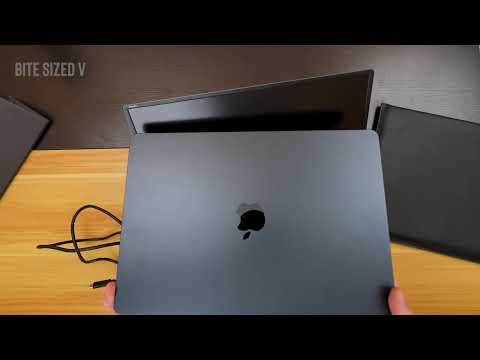
The included USB-C cable may leave no slack when the monitor sits on the left of the laptop, as one setup showed, forcing you to rotate the monitor or let it sit partly behind the laptop. Planning which side of the laptop you'll place the monitor on before connecting avoids the issue.

Does it work with a MacBook or iPad?

It can, but compatibility is reported as mixed. Auto-rotation also does not work automatically on macOS, requiring the Cmd + Option shortcut to rotate manually.

Will using the ZenScreen MB16AC drain my laptop's battery fast?

The monitor is rated at 8 watts at 5 volts, a modest load. It can run from a Surface Book for hours without a separate power adapter, though runtime depends on your laptop.

Is the screen bright enough to use outdoors?

Brightness feedback is mixed among buyers: some praise it while others note it is not the brightest screen.

Why doesn't auto-rotation work reliably?

On macOS, there is no automatic rotation at all - you rotate manually via Cmd + Option, which brings up a rotate menu for the external display.

Can I connect it with just a USB cable, or do I need HDMI and power separately?

A single USB-C cable handles video, data, and power together, which is the monitor's main selling point - no separate power brick or HDMI cable is needed on a USB-C laptop. For laptops without USB-C, the included Type-C to Type-A adapter works instead, but that path requires installing the DisplayLink driver first for the display to appear.

On Video

6 videos

The Best Portable Monitor in 2025: Asus ZenScreen Review

Cameron Dougherty Tech
All videos
  1. The Best Portable Monitor in 2025: Asus ZenScreen Review Cameron Dougherty Tech
  2. Asus ZenScreen MB16AC Review: 2nd monitor for your laptop Windows Central
  3. ASUS ZenScreen MB16ACE Portable Monitor Product Review Andy Park
  4. Asus ZenScreen Review – Best Budget Portable Monitor for MacBooks? Daantalks
  5. ASUS ZenScreen MB16AC Review: The Best Portable USB-C Monitor KLGadgetTV
  6. Is the ASUS ZenScreen MB16ACE Still Worth Buying in 2026? Bite Sized V

The Verdict

4.6Out of 5

The MB16AC solves the problem it set out to solve: a sharp, light second display that travels in the same sleeve as a laptop and runs off one cable. The 1080p IPS panel with its wide viewing angle holds up well for documents, code, and video calls, and the folding smart case works as a stand once fitted the right way round. Against the cheaper alternatives listed, this one costs considerably more, and shoppers chasing the lowest outlay will find better bargains elsewhere; the case for paying more rests on the single-cable design rather than on headline specs. Where it falls short is in the details - flaky auto-rotation on Windows and none on macOS, and brightness that can be workable in shade but not under direct sun. None of these are dealbreakers on their own, but buyers are split, with some finding it worth the purchase and others not worth the price. It is best understood as a productivity tool for people who already know they need extra screen space on the move, not a universal plug-and-play solution for every device.

Who should buy it

  • Laptop-based professionals and students who need a second screen for multitasking between documents, code, and communication apps.
  • Frequent travelers who want to avoid packing a separate power brick, since the single USB-C cable handles video, data, and power.
  • Windows users, since Windows may recognize it immediately, though auto-rotation may be flaky.
  • Coffee-shop and remote workers who value quick setup and teardown on different desks and tables.
  • Anyone who wants a built-in flicker-free, blue-light-filtered screen for long reading or coding sessions.

Who should skip it

  • Anyone needing a bright outdoor display, since 220 cd/m2 struggles in direct sunlight.
  • Gamers wanting graphics-intensive performance, since it might not be good for that though it is great for productivity.
  • Anyone who frequently needs the monitor on the opposite side of the laptop from its USB-C port, given the short cable.

The ZenScreen MB16AC is a genuinely portable second display best suited to Windows-based productivity work on the move, held back by a short cable and mixed Mac compatibility.

Check price on Amazon

More Reviews